The Beckhoff Target Browser allows users to monitor and interact with live variables inside a PLC (Programmable Logic Controller) via the Beckhoff system. By adding a target PLC route and selecting the appropriate PLC, users can observe the real-time status of the variables within the PLC system.
- PLC Variable Monitoring: Monitor live data of variables in a target PLC.
- Beckhoff System Integration: Integrates with the Beckhoff system to add PLC routes and select target devices.
- Real-time Data: View live status updates of variables in the selected PLC.
- Easy Setup: Simple configuration to add routes and select the PLC for monitoring.
Before running the program, make sure you have the following:
- A Beckhoff PLC system.
- The necessary Beckhoff software (e.g., TwinCAT or similar).
- Network access to the PLC system.
- A valid target PLC route configured in the Beckhoff system.
- Clone or download this repository to your local machine:
git clone https://github.com/umutkonmus/BeckhoffTargetBrowser.git
cd BeckhoffTargetBrowser-
Make sure that your Beckhoff system is properly set up and that the PLC is reachable over the network.
-
Run the application with the exe.
Step 1: Add Target PLC Route
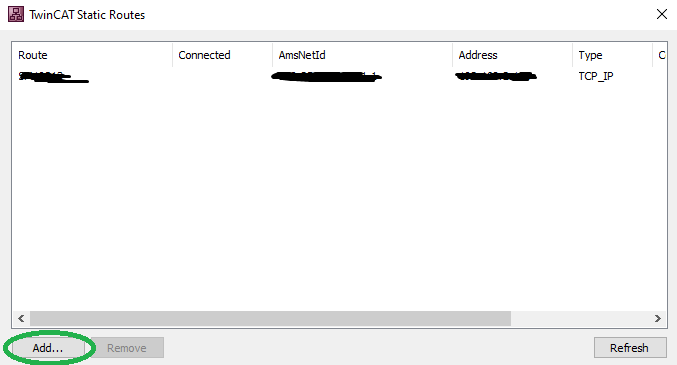
Before using the Target Browser, you need to add a target PLC route to your Beckhoff system. Follow these steps:
- Open the Beckhoff edit routes tool.
- Add the target PLC route in the Beckhoff system configuration.
- Make sure that the route is configured properly and can reach the desired PLC over the network.
Step 2: Select the Target PLC
Once the route is added, follow these steps in the Beckhoff Target Browser:
- Open the Target Browser application.
- Select the appropriate target PLC from the list.
- The system will now display the available live variables for the selected PLC.
Step 3: Monitor Live Variables
After selecting the target PLC, the application will automatically begin displaying live updates of the variables in the PLC. The live data will be updated in real-time, providing valuable insights into the operation of the PLC system.
- PLC Not Found: Ensure that the target PLC route is correctly added in the Beckhoff system and that the PLC is reachable over the network.
- Connection Issues: Verify that your network connection to the PLC is stable and that the Beckhoff system is properly configured.
- No Live Variables Displayed: Check that the selected PLC contains live variables and that the system is correctly connected.
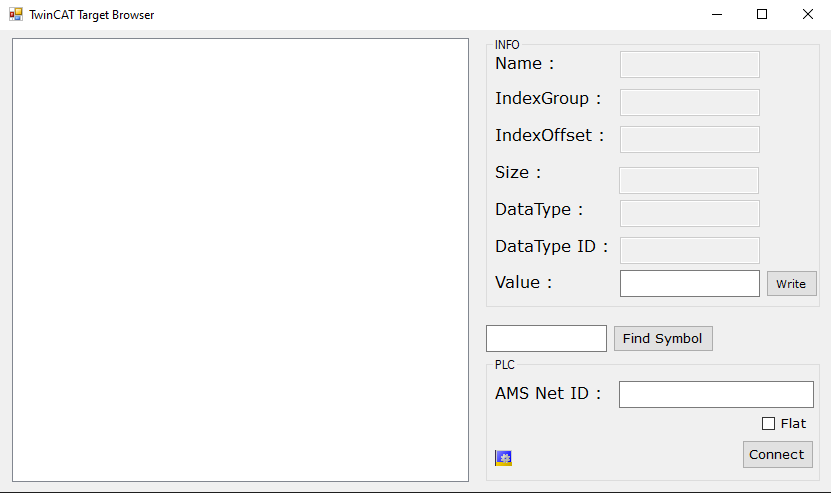
If you don't enter any AMS NetId when you click on 'connect' button, It will try to connect your local TwinCAT System.
- TwinCAT ADS Libary