Engram - An RLM-style memory layer for AI conversations. The LLM actively queries its memory through tools, enabling iterative retrieval and reasoning over stored knowledge.
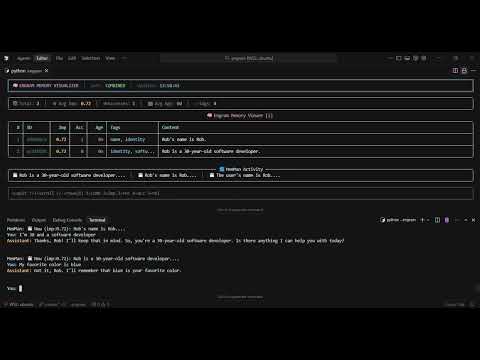
An engram is the physical trace of a memory in the brain.
- Active Memory Retrieval: LLM decides what to search, when to search, and can follow memory links
- Tool-Based Access: Memory exposed as callable tools, not passive context injection
- Iterative Reasoning: Multiple tool calls per turn enable building understanding
- Semantic Search: FAISS-based vector storage with sentence transformer embeddings
- Async Extraction: Background MemMan agent extracts new memories from conversations
- Memory Reinforcement: Similar memories are reinforced, increasing importance over time
- Local-First: All data stored locally, works offline after initial setup
Old approach (Passive RAG):
user_message → vector_search(message) → inject top-5 → LLM responds
New approach (RLM-style):
user_message → LLM with tools → LLM calls search_memory() → gets results →
                              → LLM calls get_related_memories() → follows links →
                              → LLM synthesizes and responds
The key difference: the LLM decides what to look up and can iteratively build understanding, rather than receiving a fixed context injection.
cd engram
python -m venv .venv
source .venv/bin/activate
pip install -r requirements.txt
Set your API key:
export GEMINI_API_KEY=your-api-key
# Or place in .env filepython brain.pyWith verbose mode to see tool calls:
python brain.py --verbose# Search memories
python brain.py --search "python patterns"
# Add a memory manually
python brain.py --add "Always use type hints in function signatures"
# Remove a memory by ID
python brain.py --remove abc123
# Show statistics
python brain.py --stats/help Show available commands
/memories Search your memories
/recent Show recent memories
/stats Show session statistics
/add <text> Manually add a memory
/quit Exit the chat
Monitor memory state in real-time during conversations:
# In a separate terminal
python memory_visualizer.py┌─────────────────────────────────────────────────────────────┐
│ User Message │
└──────────────────────────┬──────────────────────────────────┘
│
▼
┌─────────────────────────────────────────────────────────────┐
│ MemoryAgent │
│ ┌─────────────────────┐ │
│ │ 1. CALL LLM │ LLM receives message + tool access │
│ └─────────────────────┘ │
│ │ │
│ ▼ │
│ ┌─────────────────────┐ ┌──────────────────────────┐ │
│ │ 2. TOOL CALLS │───▶│ search_memory() │ │
│ │ (iterative) │ │ get_related_memories() │ │
│ │ │◀───│ get_recent_memories() │ │
│ └─────────────────────┘ │ store_memory() │ │
│ │ └──────────────────────────┘ │
│ ▼ │ │
│ ┌─────────────────────┐ │ │
│ │ 3. SYNTHESIZE │ LLM reasons │ │
│ │ RESPONSE │ over results │ │
│ └─────────────────────┘ ▼ │
│ ┌──────────────────────────┐ │
│ │ VectorMemory (FAISS) │ │
│ │ Semantic storage │ │
│ └──────────────────────────┘ │
│ │
│ ┌─────────────────────┐ ┌──────────────────────────┐ │
│ │ 4. EXTRACT (async) │───▶│ MemMan Agent (LLM) │ │
│ │ Queue extraction │ │ Analyze & store memories │ │
│ └─────────────────────┘ └──────────────────────────┘ │
└─────────────────────────────────────────────────────────────┘
│
▼
┌─────────────────────────────────────────────────────────────┐
│ Assistant Response │
└─────────────────────────────────────────────────────────────┘
| Component | File | Purpose |
|---|---|---|
MemoryAgent |
memory_agent.py |
RLM-style agent with tool-based memory access |
MemoryTools |
memory_tools.py |
Tool definitions for memory operations |
MemoryExtractor |
memory_extractor.py |
MemMan Agent - async LLM-powered memory extraction |
VectorMemory |
engram_pkg/core.py |
FAISS vector storage and semantic search |
MemoryVisualizer |
memory_visualizer.py |
Real-time CLI memory visualization |
The LLM has access to these tools:
| Tool | Description |
|---|---|
search_memory(query, limit) |
Semantic search over all memories |
get_related_memories(memory_id, limit) |
Follow memory links to related content |
get_recent_memories(hours, limit) |
Get recently stored memories |
store_memory(content, importance, tags) |
Store new information |
The MemMan (Memory Manager) Agent is a background LLM-powered worker that intelligently manages memory extraction:
- Async Processing: Runs in a separate thread, never blocking the main conversation
- LLM Intelligence: Uses a fast/cheap model (Gemini Flash Lite) to analyze each exchange
- Smart Filtering: Decides what's actually worth remembering vs. transient chatter
- Memory Types: Extracts preferences, facts, decisions, and insights
- Memory Reinforcement: When similar memories are detected, reinforces them
MemMan output appears in real-time during chat:
MemMan: 💾 New (imp:0.70): User prefers dark mode in applications...
MemMan: 🔄 Reinforced (acc:3, imp:0.65→0.72): Working on ProjectX...
@dataclass
class MemoryEntry:
    id: str                    # Unique identifier
    content: str               # Memory content
    timestamp: datetime        # Creation time
    importance: float          # 0.0 to 1.0
    tags: List[str]           # Categorization tags
    context: Dict[str, Any]   # Additional metadata
    access_count: int         # Usage tracking
    last_accessed: datetime   # Last retrieval time
    related_memories: List[str]  # IDs of related memories
embedding: List[float] # Vector representation| Variable | Description | Default |
|---|---|---|
GEMINI_API_KEY |
Google Gemini API key | Required |
from memory_agent import MemoryAgent, AgentConfig

config = AgentConfig(
    memory_path="vector_memory",        # Storage location
    model="gemini-2.0-flash",           # Main LLM model
    extraction_model="gemini-2.0-flash-lite",  # Extraction model
    max_tool_calls=10,                  # Max tool calls per turn
    extraction_enabled=True,            # Enable async extraction
    verbose=False                       # Show tool calls
)

agent = MemoryAgent(config=config)engram/
├── brain.py # CLI chat interface
├── memory_agent.py # RLM-style agent with tool access
├── memory_tools.py # Memory tool definitions
├── memory_extractor.py # MemMan Agent - async LLM memory management
├── memory_proxy.py # Legacy passive proxy (deprecated)
├── memory_integration.py # Memory integration layer
├── memory_context.py # Context-aware retrieval
├── memory_visualizer.py # Real-time memory TUI
├── context_window_manager.py # Token management
├── engram_pkg/ # Core package
│ ├── __init__.py
│ ├── core.py # VectorMemory class
│ ├── context.py
│ ├── integration.py
│ └── cli.py
├── vector_memory/ # Data storage
│ ├── metadata.pkl
│ └── faiss_index.bin
└── requirements.txt
MIT License