


A Docker Swarm secrets plugin that integrates with multiple secret management providers including HashiCorp Vault, AWS Secrets Manager, Azure Key Vault, and OpenBao.
swarm-external-secrets is participating in Google Summer of Code 2026 incubated under the organization OpenScienceLabs!
For more information, check out GSoC Contribution Guidelines
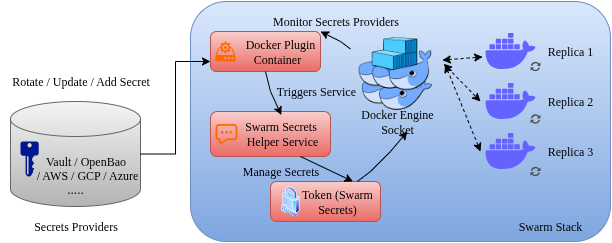
Please refer to the docs for more information.
- Multi-Provider Support: HashiCorp Vault, AWS Secrets Manager, Azure Key Vault, OpenBao
- Multiple Auth Methods: Support for various authentication methods per provider
- Automatic Secret Rotation: Monitor providers for changes and automatically update Docker secrets and services
- Real-time Monitoring: Web dashboard with system metrics, health status, and performance tracking
- Flexible Path Mapping: Customize secret paths and field extraction per provider
- Production Ready: Includes proper error handling, logging, cleanup, and monitoring
- Backward Compatible: Existing Vault configurations continue to work unchanged
The plugin now supports multiple secret providers. Configure with SECRETS_PROVIDER environment variable:
# HashiCorp Vault (default)
docker plugin set swarm-external-secrets:latest SECRETS_PROVIDER="vault"

# AWS Secrets Manager
docker plugin set swarm-external-secrets:latest SECRETS_PROVIDER="aws"

# Azure Key Vault
docker plugin set swarm-external-secrets:latest SECRETS_PROVIDER="azure"

# OpenBao
docker plugin set swarm-external-secrets:latest SECRETS_PROVIDER="openbao"
For multi-instance usage (for example, Vault + OpenBao with separate plugin names in Swarm), see docs/multi-provider.md.
Access the monitoring dashboard at http://localhost:8080 (configurable port):
- System Metrics: Memory usage, goroutine count, GC statistics
- Secret Rotation: Success/failure rates, error tracking
- Health Status: Overall system health and provider connectivity
- Performance Tracking: Response times, ticker health, uptime
docker plugin set swarm-external-secrets:latest \
    ENABLE_MONITORING="true" \
MONITORING_PORT="8080"-
Build and enable the plugin:
./scripts/build.sh
-
Configure the plugin:
docker plugin set swarm-external-secrets:latest \
    VAULT_ADDR="https://your-vault-server:8200" \
    VAULT_AUTH_METHOD="token" \
    VAULT_TOKEN="your-vault-token" \
    LOG_LEVEL="4" \
    ENABLE_ROTATION="true"
-
Use in docker-compose.yml:
HashiCorp Vault:
secrets:
  mysql_password:
    driver: swarm-external-secrets:latest
    labels:
      vault_path: "database/mysql"
      vault_field: "password"
AWS Secrets Manager:
secrets:
  api_key:
    driver: swarm-external-secrets:latest
    labels:
      aws_secret_name: "prod/api/key"
      aws_field: "api_key"
Azure Key Vault:
secrets:
  database_connection:
    driver: swarm-external-secrets:latest
    labels:
      azure_secret_name: "database-connection-string"
OpenBao:
secrets:
  app_secret:
    driver: swarm-external-secrets:latest
    labels:
      openbao_path: "app/config"
      openbao_field: "secret_key"
-
Optional: enable plugin log sidecar (for
docker compose logsvisibility):On Linux, the default plugin log path is
/run/swarm-external-secrets/plugin.log. macOS and Windows filesystems do not support this/run/**path by default, so create a writable log directory on the host and pointPLUGIN_LOG_PATHat it.sudo mkdir -p /run/swarm-external-secrets sudo touch /run/swarm-external-secrets/plugin.log docker compose -f docker-compose.yml -f docker-compose.logs.yml up -d docker compose -f docker-compose.yml -f docker-compose.logs.yml logs -f secrets-logger
Example for macOS or Windows Docker Desktop:
mkdir -p ./logs
touch ./logs/plugin.log
docker plugin set swarm-external-secrets:latest \
  PLUGIN_LOG_PATH="$PWD/logs/plugin.log"
| Provider | Status | Authentication | Rotation |
|---|---|---|---|
| HashiCorp Vault | ✅ Stable | Token, AppRole | ✅ |
| AWS Secrets Manager | ✅ Stable | IAM, Access Keys | ✅ |
| Azure Key Vault | ✅ Stable | Service Principal, Access Token | ✅ |
| OpenBao | ✅ Stable | Token, AppRole | ✅ |
| GCP Secret Manager | 🚧 Placeholder | - | - |
docker plugin set swarm-external-secrets:latest \
    SECRETS_PROVIDER="vault" \
    VAULT_ADDR="https://vault.example.com:8200" \
VAULT_TOKEN="hvs.example-token"docker plugin set swarm-external-secrets:latest \
SECRETS_PROVIDER="aws" \
AWS_REGION="us-west-2" \
AWS_ACCESS_KEY_ID="AKIAIOSFODNN7EXAMPLE"docker plugin set swarm-external-secrets:latest \
SECRETS_PROVIDER="azure" \
AZURE_VAULT_URL="https://myvault.vault.azure.net/" \
AZURE_TENANT_ID="12345678-1234-1234-1234-123456789012"If you want to explore the repository or read more, check out Ask DeepWiki.