


順序 (junjo): order, sequence, procedure
Junjo is a modern Python library for designing, executing, testing, and debugging complex, graph-based AI workflows.
Whether you’re building a simple chatbot, a complex data manipulation pipeline, or a sophisticated workflow with dynamic branching and parallel execution, Junjo provides the tools to define and debug your logic as a clear graph of nodes, edges, and state updates.
- ✨ Visualize your AI workflows
- 🧠 Redux inspired state management and state debugging tools
- ⚡️ Concurrency and type safety native with asyncio and pydantic
- 🔗 Organize conditional chains of LLM calls into observable graph workflows
- 🏎️ Easy patterns for directed graph loops, branching, and concurrency
- 🧪 Eval-Driven Development focused
- Build massive eval sets by mocking node state
- Programmatically build and update eval sets with agentic code assistants
- Eval patterns are based on pytest, leveraging its testing framework and capabilities
- Rapidly iterate on your AI capabilities and avoid regressions
- 🔭 OpenTelemetry native
- Provides organized, structured traces to any OpenTelemetry provider
- Companion open source Junjo AI Studio enhances debugging and evaluation of production data
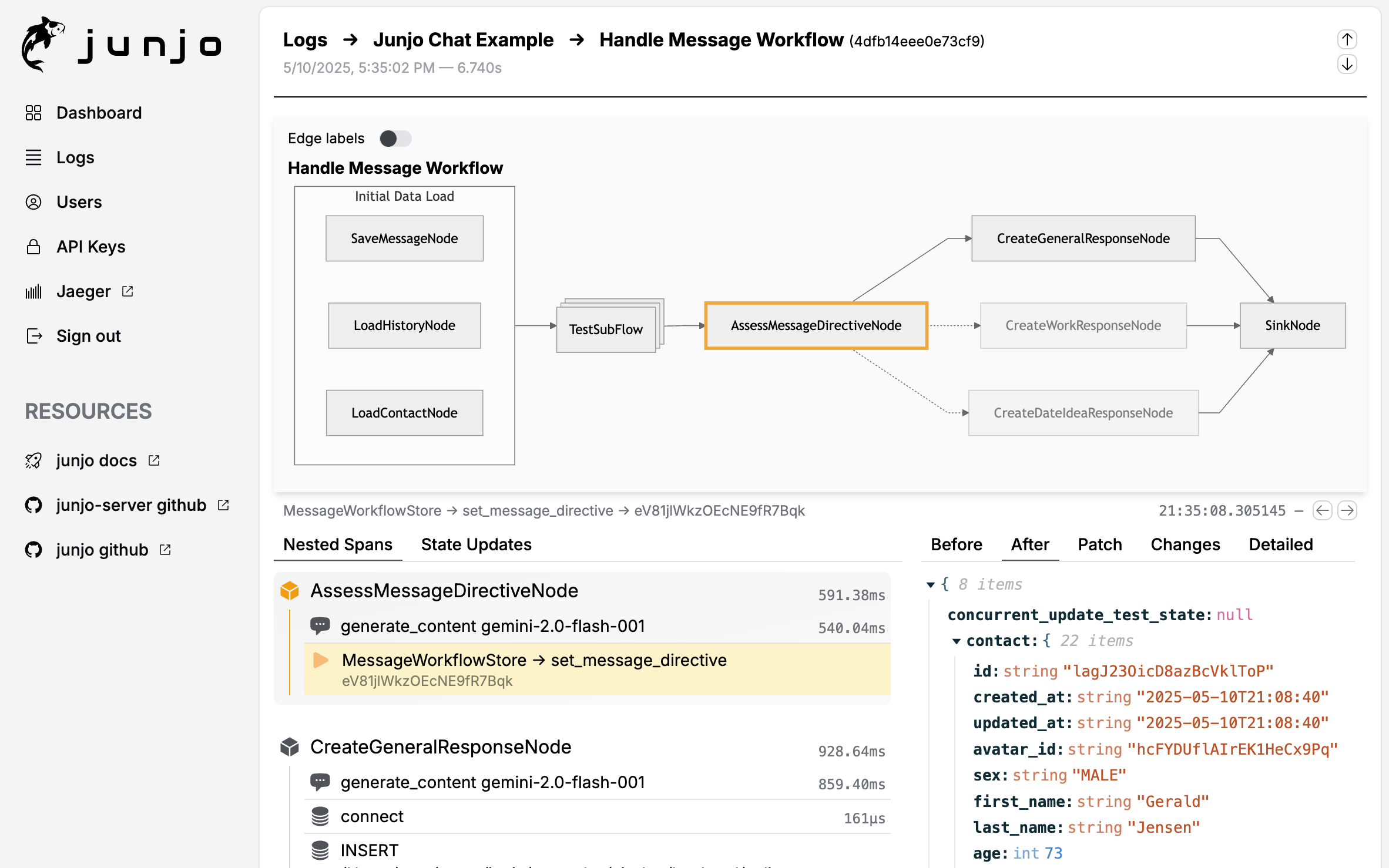
Junjo strives to be the opposite of a "black box". Transparency, observability, eval driven development, and production data debugging are requirements for AI applications handling mission critical data, that need repeatable and high accuracy chained LLM logic.
Junjo doesn't change how you implement LLM providers or make calls to their services.
Continue using google-genai, openai-python, grok / xai sdk, anthropic-sdk-python, LiteLLM or even REST API requests to any provider.
Junjo remains decoupled from LLM providers. There are no proprietary implementations, no hijacking of python docstrings, no confusing or obfuscating decorators, and no middleman proxies.
Junjo simply helps you organize your python functions (whether they be logic, LLM calls, RAG retrieval, REST API calls, etc.) into a clean organized graph structure with predictable, testable, and observable execution.
Junjo provides primitive building blocks that let you build any sort of executable workflow. From linear chains of LLM calls, to complex branching workflows with concurrent subflows, to fully autonomous agents.
Junjo uses conventional Pythonic architecture. Rather than obfuscating, proprietary decorators or runtime scripts that hijack execution, Junjo graph workflows are constructed conventionally with python classes and generics, and Pydantic models for type safe immutable state.
State is modeled after the conventional Elm Architecture, and inspired by Redux for clean separation of concerns, concurrency safety, and debuggability.
This helps your language server auto-complete methods and properties, and makes it easy for AI Coding agents to scaffold and understand massive Junjo workflows without needing to learn proprietary, library-specific logic patterns.
Junjo organizes conventional OpenTelemetry spans into easy to understand groups. Your existing OpenTelemetry provider will continue to work, now with enhanced span organization. Junjo AI Studio is a companion OpenTelemetry platform with enhanced visuals and debugging tools for Junjo workflows.
Junjo can work alongside other AI Agent frameworks. Junjo Workflows can be setup as tools that Autonomous Agent frameworks can call for high-accuracy repeatable processes (like RAG retrieval or complex document parsing logic).
You can execute autonomous agent capabilities from other libraries inside a Junjo AI workflow. For example, a Junjo workflow node can run a smolagents tool calling agent as a single step within a greater Junjo workflow or subflow.
Find several example Junjo applications inside the examples directory in this repository.
- AI Chat - a full featured chat application that can spawn new personas to chat with. This includes a react frontend and a FastAPI backend.
- Getting Started - the basis of our getting started documentation
- Base Example - a minimal python example showcasing several Junjo patterns
This is a single-file implementation of a basic Junjo powered python application. See the getting started directory for dependencies, requirements, and instructions to run this.
from junjo import BaseState, BaseStore, Condition, Edge, Graph, Node, Workflow

# Run With
# python -m main
# uv run -m main

async def main():
    """The main entry point for the application."""

    # Define the workflow state
    class SampleWorkflowState(BaseState):
        count: int | None = None # Does not need an initial state value
        items: list[str] # Does need an initial state value

    # Define the workflow store
    class SampleWorkflowStore(BaseStore[SampleWorkflowState]):
        # An immutable state update function
        async def set_count(self, payload: int) -> None:
            await self.set_state({"count": payload})

    # Define the nodes
    class FirstNode(Node[SampleWorkflowStore]):
        async def service(self, store: SampleWorkflowStore) -> None:
            print("First Node Executed")

    class CountItemsNode(Node[SampleWorkflowStore]):
        async def service(self, store: SampleWorkflowStore) -> None:
            # Get the state and count the items
            state = await store.get_state()
            items = state.items
            count = len(items)

            # Perform a state update with the count
            await store.set_count(count)
            print(f"Counted {count} items")

    class EvenItemsNode(Node[SampleWorkflowStore]):
        async def service(self, store: SampleWorkflowStore) -> None:
            print("Path taken for even items count.")

    class OddItemsNode(Node[SampleWorkflowStore]):
        async def service(self, store: SampleWorkflowStore) -> None:
            print("Path taken for odd items count.")

    class FinalNode(Node[SampleWorkflowStore]):
        async def service(self, store: SampleWorkflowStore) -> None:
            print("Final Node Executed")

    class CountIsEven(Condition[SampleWorkflowState]):
        def evaluate(self, state: SampleWorkflowState) -> bool:
            count = state.count
            if count is None:
                return False
            return count % 2 == 0

    def create_graph() -> Graph:
        """
        Factory function to create a new instance of the sample workflow graph.
        This ensures that each workflow execution gets a fresh, isolated graph,
        preventing state conflicts in concurrent environments.
        """
        # Instantiate the nodes
        first_node = FirstNode()
        count_items_node = CountItemsNode()
        even_items_node = EvenItemsNode()
        odd_items_node = OddItemsNode()
        final_node = FinalNode()

        # Create the workflow graph
        return Graph(
            source=first_node,
            sink=final_node,
            edges=[
                Edge(tail=first_node, head=count_items_node),

                # Branching based on the count of items
                Edge(tail=count_items_node, head=even_items_node, condition=CountIsEven()), # Only transitions if count is even
                Edge(tail=count_items_node, head=odd_items_node), # Fallback if first condition is not met

                # Branched paths converge to the final node
                Edge(tail=even_items_node, head=final_node),
                Edge(tail=odd_items_node, head=final_node),
            ]
        )

    def create_workflow() -> Workflow[SampleWorkflowState, SampleWorkflowStore]:
        """
        Factory function to create a new instance of the workflow.
        This pattern is recommended to avoid concurrency issues and ensure
        fresh state/store initialization for each execution.
        """
        return Workflow[SampleWorkflowState, SampleWorkflowStore](
            name="Getting Started Example Workflow",
            graph_factory=create_graph,
            store_factory=lambda: SampleWorkflowStore(
                initial_state=SampleWorkflowState(
                    items=["laser", "coffee", "horse"]
                )
            )
        )

    # Create and execute the workflow
    workflow = create_workflow()
    await workflow.execute()
    print("Final state: ", await workflow.get_state_json())

if __name__ == "__main__":
    import asyncio
asyncio.run(main())Agentic AI applications use LLMs to determine the order of execution of python functions. These functions may involve LLM requests, API requests, database CRUD operations, etc.
The simplest way to organize functions that can be / need to be conditionally executed in a certain order is in the form of a directed graph.
A directed graph gives one the building blocks to create any sort of agentic application, including:
- High precision workflows in the form of a Directed Acyclic Graph (DAG)
- Autonomous AI Agents in the form of dynamically determined directed graphs
Junjo AI Studio is our open source companion telemetry and debugging platform. It ingests Junjo's OpenTelemetry spans, providing execution visualizations and step-by-step debugging of state changes made by LLMs.
Quick Start:
# Create docker-compose.yml (see docs for full example)
# Start services
docker compose up -d

# Access UI at http://localhost:5153
Features:
- Interactive graph visualization with execution path tracking
- State step debugging - see every state change in chronological order
- LLM decision tracking and trace timeline
- Multi-execution comparison
- Built specifically for graph-based AI workflows
Architecture: Three-service Docker setup (backend, ingestion service, frontend) that runs on minimal resources (1GB RAM, shared vCPU).
See the Junjo AI Studio for complete setup and configuration.
Example Repositories:
- Junjo AI Studio - Minimal Build - a docker compose environment of the essential Junjo AI Studio services.
- Junjo AI Studio - Deployment Example - a production VM ready deployment example, including Caddy reverse proxy and SSL certificate handling.
Junjo can render workflow graphs as images. It requires Graphviz to be installed on the underlying system (your developer computer or the docker image), as well as the above optional graphviz development dependencies in this python library.
# Install Graphviz on MacOS with homebrew
$ brew install graphviz
# visualize.py
from base.sample_workflow.graph import create_sample_workflow_graph
def main():
# Every graph can execute .export_graphviz_assets() to generate all graphs and subflow graphs in a workflow
# Creates .svg renderings, .dot notation files, and an HTML template to render the graphs
create_sample_workflow_graph().export_graphviz_assets()
if __name__ == "__main__":
main()# Run the visualizer
$ cd examples/base
$ uv run --package base -m base.visualize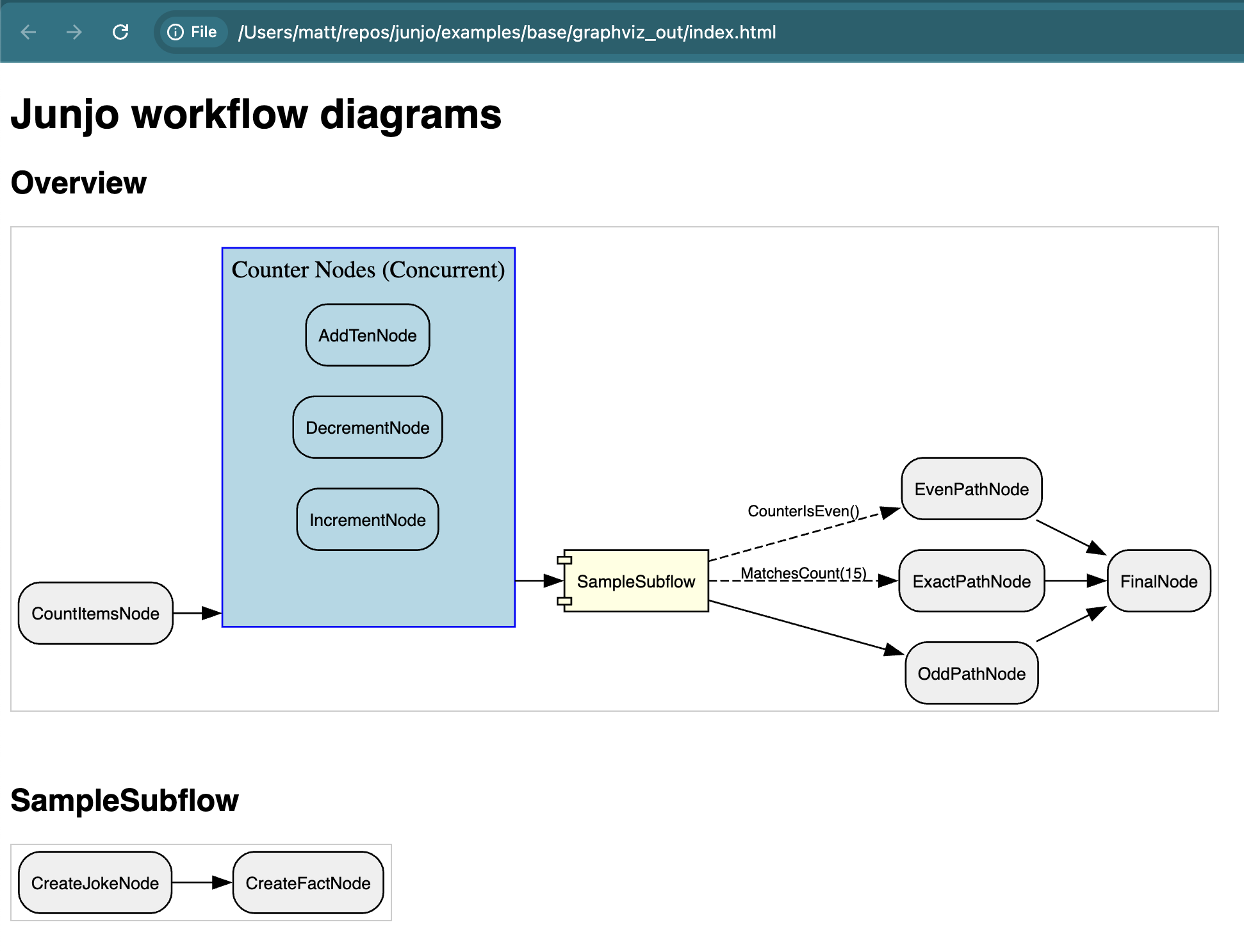
This project was made with the uv python package manager.
# Setup and activate the virtual environment
$ uv venv --python 3.11 .venv
$ source .venv/bin/activate

# Install optional development dependencies (graphviz is optional for running the graphviz visualizer)
# Graphviz, if utilized, must also be installed on the host system (see below)
# Option 1:
$ uv pip install -e ".[dev,graphviz]"

# Option 2:
$ uv sync --all-extrasThis project utilizes ruff for linting and auto formatting. The VSCode settings.json in this project helps with additional formatting.
# 1. ensure optional development dependencies are installed (see above)
# 2. ensure the virtual environment is activated (see above)

# Execute the build command to preview the new docs.
# They will appear in a .gitignored folder docs/_build
$ uv run sphinx-build -b html docs docs/_build# Run the tests with uv
$ uv run pytest