Website | Discord | Flathub | AUR | FlakeHub
EVE Preview Manager is a Linux-native tool for managing multiple EVE Online clients, with live window previews, configurable hotkeys, and quick-swap profiles built for multiboxing.
- Real-time thumbnail previews of all EVE client windows
- Per-character and cycle group hotkeys with configurable key bindings
- Customizable thumbnail appearance including size, opacity, fonts, colors, and borders
- Profile-based configuration system for managing multiple setups
- One-click character import for cycle groups
- Optional cycling through logged-off clients
- Auto-minimize inactive windows and inherit positions for new characters
- Option to disable thumbnails altogether
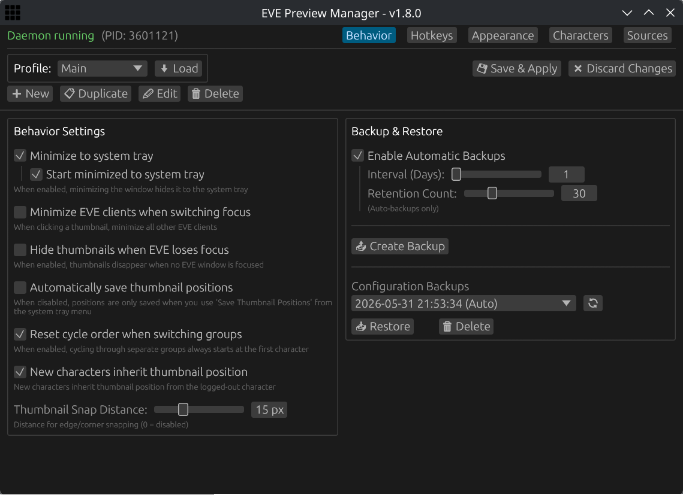
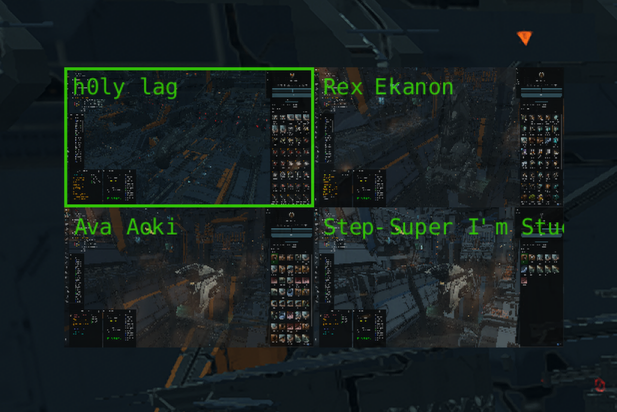
- Launch the Application: Run
eve-preview-manager(orflatpak run com.evepreview.manager). It starts in GUI mode and creates a system tray icon. - Manage Profiles: Use the GUI to create specific profiles for different activities (e.g., PvP, Mining). You can add, remove, or duplicate profiles to quickly switch between setups.
- Configure Display Settings: Customize the look and feel of your thumbnails, including size, opacity, fonts, borders, and colors to match your preferences.
- Set Up Hotkeys: Configure hotkeys to cycle between clients in your active group.
- Manage Characters:
- Add Characters: Click the "Add" button to include EVE characters in your cycle group. Active and previously detected clients will appear in the popup.
- Manual Entry: Alternatively, switch to "Text Editor" mode to manually paste a list of character names (one per line).
- Individual Hotkeys: Once added to the cycle group, you can bind specific hotkeys to individual characters for direct access.
- Save & Apply: Click "Save & Apply" to save your current configuration and refresh the previews.
- Swap Profiles: Swapping profiles can be done quickly by right-clicking the system tray icon and selecting the desired profile.
Note: Configuration is stored in ~/.config/eve-preview-manager/config.json.
- Required: OpenGL, fontconfig, dbus, libxkbcommon, libxcb (standard on most distros).
- Recommended: Wayland (via XWayland). Native X11 environments are supported but users may experience issues with preview overlays fighting for Z-order and incorrect image offsets.
- Optional: If using evdev instead of x11 hotkeys, you will need to add your user to the
inputgroup. Not recommended unless you know what you're doing.
Install from Flathub:
flatpak install flathub com.evepreview.managerInstall from the AUR using your preferred AUR helper (e.g., paru, yay, pamac, pikaur, etc):
paru -S eve-preview-managerAdd the input to your flake.nix. We use FlakeHub for versioned releases.
inputs = {
  eve-preview-manager.url = "https://flakehub.com/f/h0lylag/EVE-Preview-Manager/*";
};Add the package to your system packages.
{
  environment.systemPackages = [
    eve-preview-manager.packages.${pkgs.stdenv.hostPlatform.system}.default
  ];
}Download the latest release from the Releases page. This archive contains a standalone binary that works on most major Linux distributions (Ubuntu, Fedora, etc.).
unzip eve-preview-manager-v*.zip
chmod +x ./eve-preview-manager
./eve-preview-manager
Build dependencies: Rust/Cargo, pkg-config, fontconfig, dbus, X11, libxkbcommon
git clone https://github.com/h0lylag/EVE-Preview-Manager.git
cargo build --releaseContributions are welcome! If you find a bug or have a feature request, please open an issue. Pull requests are also appreciated.
Distributed under the MIT License. See LICENSE for more information.