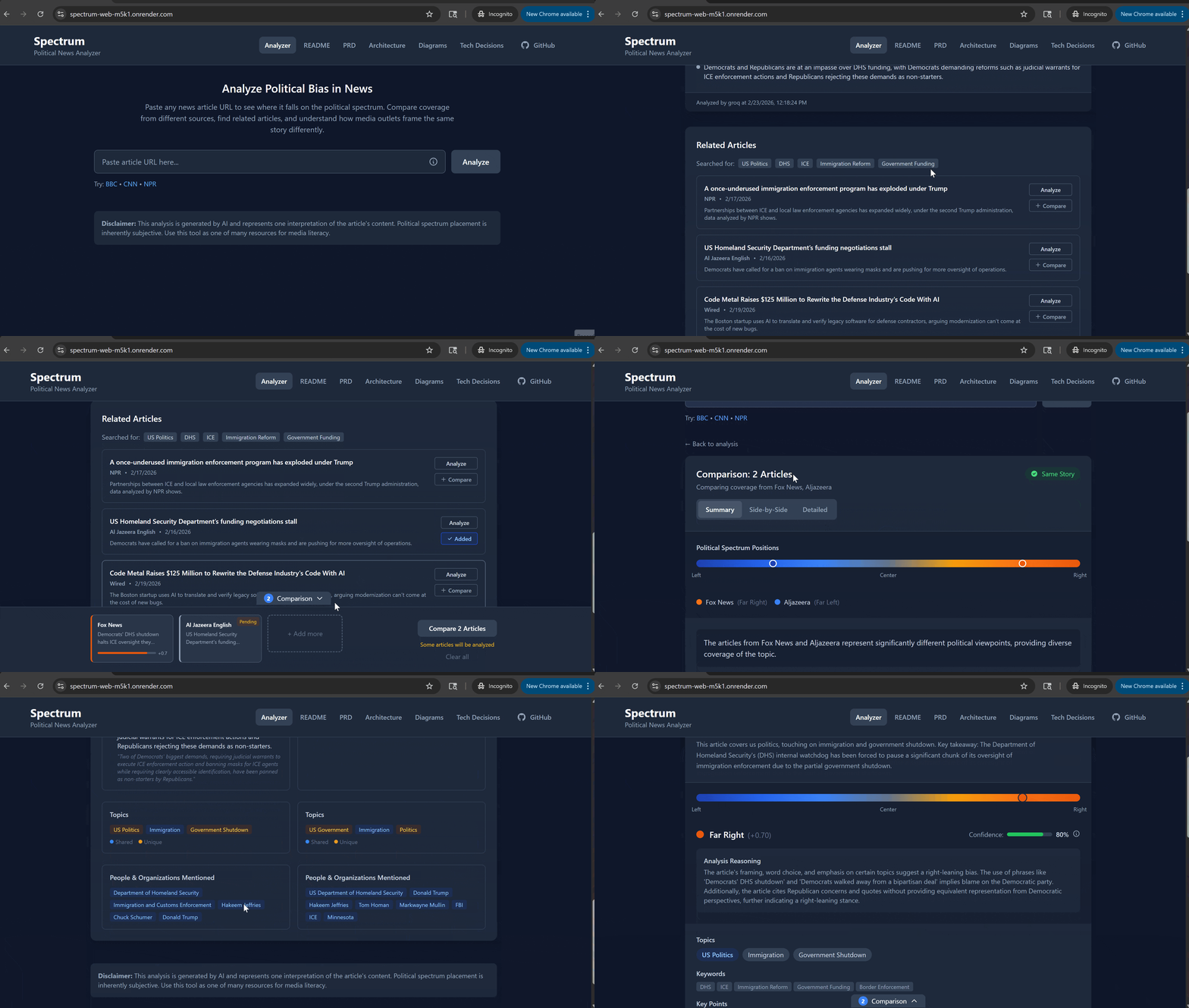
A web application that analyzes news articles to show where they fall on the political spectrum, finds related coverage from other sources, and compares how different outlets cover the same story.

- Python 3.11+
- Node.js 18+
- API Keys (free):
- Groq API Key - for AI analysis
- NewsAPI Key - for finding related articles
# From the project root directory

# Create virtual environment
python -m venv .venv
source .venv/bin/activate  # On Windows: .venv\Scripts\activate

# Install dependencies
pip install -r requirements.txt

# Configure environment
cp .env.example .env
# Edit .env and add your API keys

# Run the server
uvicorn app.main:app --reload
The API will be available at http://localhost:8000
- API docs:
http://localhost:8000/docs - Health check:
http://localhost:8000/api/v1/health
# From the project root directory
cd spectrum-web

# Install dependencies
npm install

# Run development server
npm run dev
The frontend will be available at http://localhost:5173
spectrum/
├── app/                    # Python backend (FastAPI)
│   ├── api/                # API routes
│   │   └── routes/         # articles, comparisons, docs, health
│   ├── core/               # Business logic
│   ├── services/           # External integrations
│   └── schemas/            # Data models
├── spectrum-web/           # React frontend
│   └── src/
│       ├── app/            # App.tsx with navigation tabs
│       ├── features/       # Feature modules (analysis, spectrum, comparison, related-articles)
│       ├── components/     # Shared components
│       │   ├── common/     # ErrorMessage, LoadingSpinner, etc.
│       │   └── docs/       # MarkdownViewer, MermaidDiagram
│       ├── stores/         # Zustand stores (comparison, search history)
│       └── lib/            # API client
├── docker/                 # Docker configuration
├── prd.md                  # Product Requirements Document
├── ARCHITECTURE.md         # Backend Architecture Guide
├── TECH_DECISIONS.md       # Technology Decision Rationale
└── diagrams.md             # Mermaid diagrams
Explains why each technology was chosen over alternatives:
- Language & Framework choices - Python/FastAPI over Node/Django, React over Vue/Svelte
- Tooling decisions - Vite, TypeScript, Tailwind, Zustand, TanStack Query
- External services - Groq AI, NewsAPI, caching strategy
- Architecture patterns - Clean Architecture, Strategy pattern, dependency injection
- Tradeoffs - What we gain and lose with each choice, when to choose differently
The PRD contains the complete product specification:
- Overview & Vision - What Spectrum does and why
- MVP Scope - Features for initial release (URL analysis, related articles, comparison)
- Feature Specifications - Detailed user flows and functionality
- Political Spectrum Analysis - How the AI determines political leaning (5 weighted dimensions)
- Technical Stack - Python/FastAPI backend, React/TypeScript frontend, Groq AI
- Implementation Plan - Step-by-step build guide in 4 phases
- Verification Plan - How to test the application works correctly
- Bias Mitigation - Strategies for transparent, fair analysis
The architecture document provides detailed technical design:
- Architecture Principles - Clean architecture, dependency injection, strategy pattern
- Project Structure - Directory layout and file organization
- API Endpoints - All REST endpoints with request/response schemas
- Service Layer - How components interact (fetchers, AI providers, aggregators, cache)
- Data Models - Pydantic schemas for articles, analysis, comparisons
- AI Provider Abstraction - Swappable AI providers (Groq, Claude, OpenAI)
- Caching Strategy - Multi-layer caching to minimize API costs
- Configuration - Environment variables and settings
- Docker Setup - Containerization for deployment
| Endpoint | Method | Description |
|---|---|---|
/api/v1/health |
GET | Health check |
/api/v1/articles/analyze |
POST | Analyze article political leaning |
/api/v1/articles/related |
POST | Find related articles |
/api/v1/articles/sources |
GET | Get supported/blocked sources list |
/api/v1/comparisons |
POST | Compare multiple articles |
/api/v1/docs/{doc_name} |
GET | Get documentation (readme, prd, architecture, diagrams, tech-decisions) |
Not all news websites allow automated access. Here's what works and what doesn't:
These sources work reliably:
| Source | Notes |
|---|---|
| NPR | Consistent article extraction |
| BBC | Works well for both .com and .co.uk |
| CNN | Works well, sometimes large content |
| Fox News | Reliable |
| Breitbart | Reliable |
| LA Times | Reliable |
| The Guardian | Reliable |
These sources may work but have inconsistent results (JavaScript-heavy sites, content extraction issues):
| Sources |
|---|
| HuffPost, Vox, Mother Jones, Slate, The Atlantic, MSNBC |
| AP News, PBS, USA Today, ABC News, CBS News, NBC News |
| National Review, NY Post, Washington Examiner, Daily Wire, Chicago Tribune |
These sites actively block web scrapers:
| Source | Reason |
|---|---|
| NY Times | Blocks automated access (403) |
| Washington Post | Aggressive bot protection |
| Wall Street Journal | Requires subscription |
| Reuters | Requires authentication |
| Politico | Blocks automated access |
| The Hill | Blocks automated access |
| The Federalist | Blocks automated access |
Note: Source compatibility may change as websites update their policies. The app shows source compatibility info via the (i) icon next to the URL input.
# Required
GROQ_API_KEY=your_groq_key
NEWSAPI_KEY=your_newsapi_key

# Optional
DEFAULT_AI_PROVIDER=groq
CACHE_BACKEND=memory
DEBUG=true-
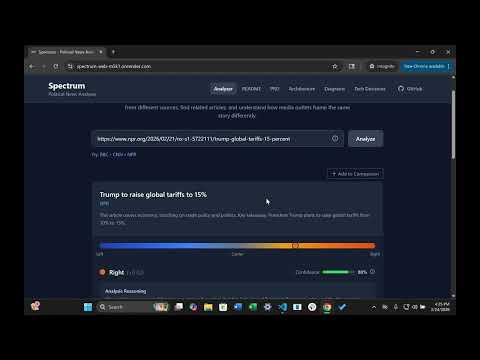
Article Analysis: Paste any news article URL to get political spectrum analysis
- Score from -1 (far left) to +1 (far right)
- Political spectrum visualization with blue (left) → slate (center) → orange (right) gradient
- Confidence indicator with info tooltip explaining methodology
- Brief article summary generated from topics and key points
- AI-generated reasoning for the political score
- Score transparency breakdown: Expandable "How was this score calculated?" section showing:
- Individual scores for 5 criteria (Language & Framing, Source Selection, Topic Emphasis, Tone & Objectivity, Source Reputation)
- Mini spectrum bar for each criterion with explanation
- Economic and Social dimension scores (when applicable)
- Overall score is the average of the 5 criteria scores
- Topic and keyword extraction
- Key points identification
-
Related Articles: Automatically finds related coverage from other sources
- Uses NewsAPI to search by extracted keywords
- One-click analyze for any related article
-
Search History: Quick access to previously analyzed articles
- Shows last 10 articles searched (persisted in localStorage)
- Visual success/failure indicators
- Click to re-analyze, or remove individual entries
- Clear all history option
-
Article Comparison: Compare multiple articles side-by-side
- Comparison tray at bottom of screen for collecting articles
- Add analyzed articles or related articles to comparison
- Visual spectrum showing all articles' positions
- Summary of political spread
- Shared topics identification
-
Documentation Viewer: In-app access to project documentation
- Navigate via tabs in header: README, PRD, Architecture, Diagrams, Tech Decisions
- Full markdown rendering with syntax highlighting
- Mermaid diagram support for architecture visualizations
- GitHub repository link in header
- User accounts and saved history
- Chrome browser extension (would solve JavaScript rendering issues - see note below)
- Redis caching (uses in-memory cache)
- Advanced comparison (agreements/disagreements extraction)
Browser Extension Note: A browser extension would solve the "partial support" JavaScript rendering issue entirely. The extension runs after all JS has executed, giving access to the fully-rendered DOM. It would also work for paywalled sites the user subscribes to. See TECH_DECISIONS.md for details.
- Rate limiting - API rate limits to prevent abuse (10 analyze/min, 5 compare/min)
- Docker deployment - Production-ready Docker configuration with multi-stage builds
- Hosting setup - Render blueprint for easy deployment
- Score transparency - Expandable breakdown showing individual criteria scores
- Criteria weighting investigation - Analyze whether criteria should be weighted differently (currently equal)
- Fix comparison feature - Investigate and fix issues with the article comparison functionality
- Security audit - Review input validation, XSS prevention, API key handling, dependency vulnerabilities
- Backend: Python 3.11, FastAPI, Pydantic
- Frontend: React 18, TypeScript, Vite, Tailwind CSS
- AI: Groq API (llama-3.3-70b-versatile)
- News Data: NewsAPI.org
- State Management: Zustand + TanStack Query
- Caching: In-memory with TTL (cachetools)
- Rate Limiting: slowapi (10 analyze/min, 5 compare/min, 20 related/min)
# Development (with hot reload)
cd docker
docker compose up

# Production build (local testing)
docker compose -f docker-compose.prod.yml upThe project includes a render.yaml blueprint:
- Connect your GitHub repo to Render
- Render auto-detects the blueprint and creates services
- Add environment variables in Render dashboard:
GROQ_API_KEY- your Groq API keyNEWSAPI_KEY- your NewsAPI key
- Deploy
Note: Free tier sleeps after 15 minutes of inactivity. First request after sleep takes ~30 seconds.
Backend (any Docker host):
# Build
docker build -t spectrum-api -f docker/Dockerfile --target production .

# Run
docker run -p 8000:8000 \
  -e GROQ_API_KEY=your_key \
  -e NEWSAPI_KEY=your_key \
  -e ALLOWED_ORIGINS='["https://your-frontend.com"]' \
  spectrum-api
Frontend (any static host - Vercel, Netlify, Cloudflare Pages):
cd spectrum-web
VITE_API_URL=https://your-api-url.com npm run build
# Deploy the `dist` folderThe API enforces rate limits to prevent abuse:
| Endpoint | Limit | Reason |
|---|---|---|
/articles/analyze |
10/minute | AI API costs |
/comparisons |
5/minute | Multiple AI calls |
/articles/related |
20/minute | NewsAPI limits |
| Other endpoints | 100/minute | General protection |
Rate limit errors return HTTP 429 with retry information