This program allows you to perform some arithmetic operations on matrices, as well as solve systems of linear equations, which is often useful in linear algebra.
To use the program you just have to open the matrix.py file and write necessary operations there.
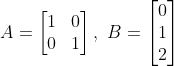
To define a matrix, enter it in the format of a list of lists, where lists are the rows of the matrix. For example:
A = Matrix([[1, 0], [0, 1]])
B = Matrix([[0], [1], [2]])
This code defines the following matrices:
To get the matrix size, use the size() method. For example:
A = Matrix([[0, 1], [2, 3]])
print(A.size())  # (2, 2)
You can also add and subtract matrices, multiply them by a number and by other matrices. For example:
A = Matrix([[0, 2, 4], [1, 3, 5]])
B = Matrix([[25, 0, 0], [5, -1, 2]])
C = Matrix([[2, 5, 5], [1, 2, 3], [20, 0, 20]])
print((A + 3 * B) * C)  # [[232, 379, 461], [252, 80, 300]]
print(A - 0.1 * B)      # [[-2.5, 2.0, 4.0], [0.5, 3.1, 4.8]]
To transpose the matrix, use the transpose() method. This method changes the matrix to which it is applied, while the transposed() function just returns the transposed matrix. For example:
A = Matrix([[1, 2, 3], [3, 4, 5]])
B = Matrix([[3, 9], [27, 81]])
A.transpose()
print(A)              # [[1, 3], [2, 4], [3, 5]]
print(transposed(B))  # [[3, 27], [9, 81]]
print(B)              # [[3, 9], [27, 81]]
You can define a square matrix and raise it to a non-negative integer power. For example:
A = SquareMatrix([[1, 2], [4, 8]])
print(A ** 4)  # [[729, 1458], [2916, 5832]]
To get the trace of a square matrix, use the trace() method. For example:
A = SquareMatrix([[20, 30], [5, -2]])
print(A.trace())  # 18
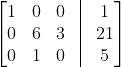
To solve a system of linear equations, define the corresponding matrix of coefficients (left side of augmented matrix) and use the solve(B) method, where B is a list, the right side of augmented matrix. For example:
A = Matrix([[1, 0, 0], [0, 6, 3], [0, 1, 0]])
answer = A.solve([1, 21, 5])
print(answer)  # [1.0, 5.0, -3.0]
This code solves the following system of linear equations:
If a system of linear equations has no solutions or infinitely many solutions, the program will raise an exception with this message.