
🎉 ProseFlow v0.3.0 – Release Notes
We are excited to launch ProseFlow v0.3.0, a landmark release that transforms how you create and use AI-powered actions. This update introduces Templated Actions with Placeholders, a powerful new Generation Mode for creating content from scratch, and a completely overhauled Actions UI with bulk-management capabilities.
These features turn simple prompts into dynamic, reusable, and shareable tools, elevating ProseFlow from a text processor to a comprehensive AI workflow engine.
🌟 Highlights
1. Templated Actions with Placeholders
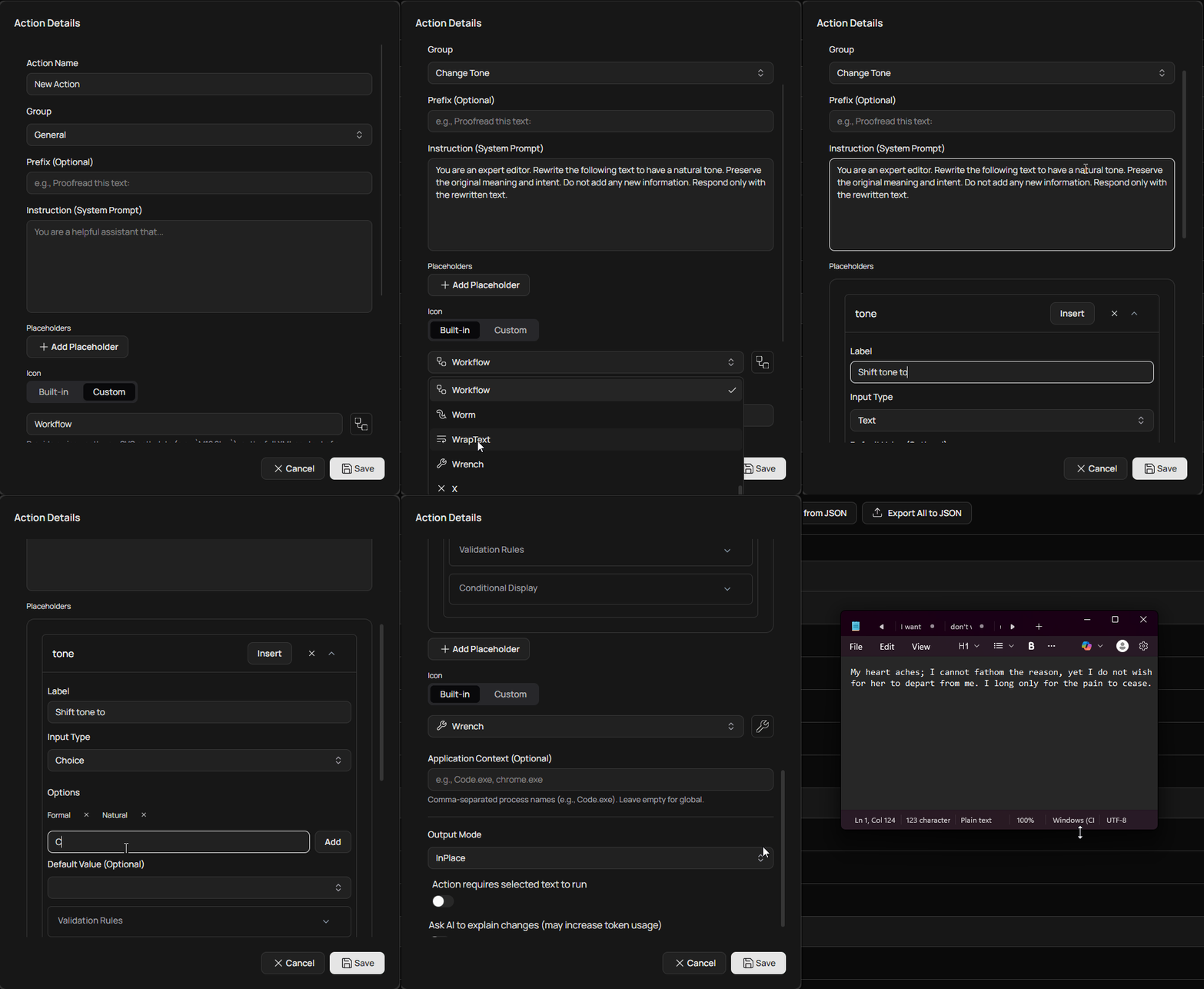
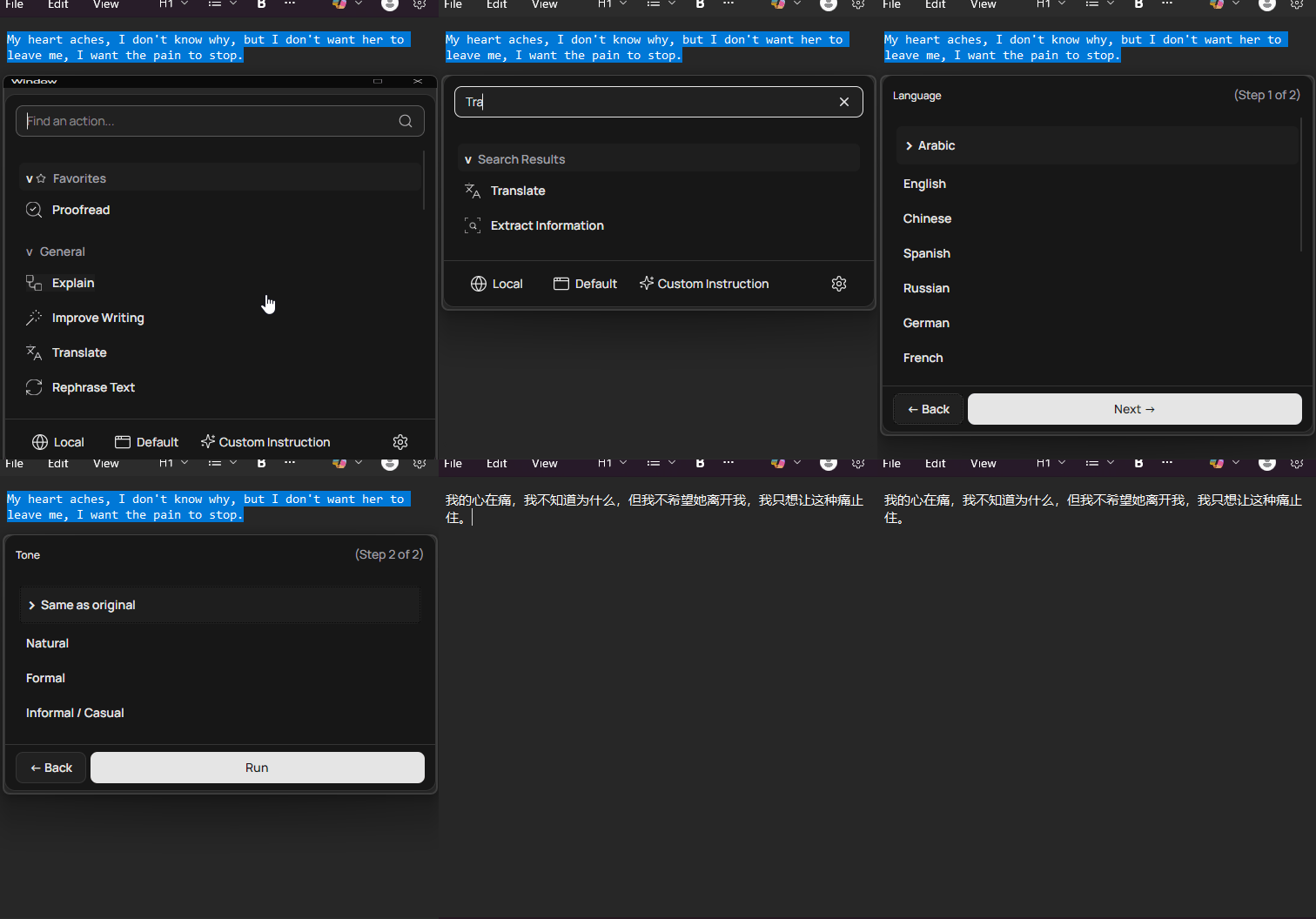
Actions are no longer static prompts! You can now create dynamic, multi-step workflows by embedding placeholders (e.g., [language]) in your instructions. When you run a templated action, the floating menu guides you through a step-by-step form to fill in the details.
- Multiple Input Types: Choose from Text, Multiline Text, Choice (dropdown), Boolean (Yes/No), Number, Date, and even a File Picker.
- Validation Rules: Enforce required fields, set character limits, or define numeric ranges to ensure valid input.
- Conditional Logic: Create intelligent workflows by showing or hiding subsequent steps based on user input.
- Smart Defaults: Pre-fill values with dynamic tokens like
{clipboard},{date:yyyy-MM-dd}, and{appContext}to accelerate common tasks. - New Presets: Get started with powerful new templated actions, including Summarize, Translate, Rephrase, Write an Email, and Create Social Media Post.
💡 This feature transforms simple actions into sophisticated, reusable applications for complex tasks.
| Advanced Action Editor | Templated Action Menu |
 |
 |
2. Generation Mode & Enhanced Custom Instructions
ProseFlow now excels at creating content from scratch. Actions can be designated as not requiring selected text (requiresSelection: false), enabling a new Generation Mode.
- Generate from Scratch: When no text is selected, the floating menu filters for generation-capable actions. The search bar becomes a prompt input field, allowing you to describe what you want to create.
- Save Custom Instructions: The "Custom Instruction" feature now logs the full instruction to your history. You can save these ad-hoc prompts as new, reusable actions directly from the history view with a single click.
3. Overhauled Actions UI with Bulk Management
The Actions screen has been completely redesigned for power users and teams managing large sets of actions.
- Multi-Selection: Use checkboxes to select multiple actions at once.
- Contextual Toolbar: A new toolbar appears when items are selected, enabling bulk operations:
- Bulk Delete: Permanently remove multiple actions.
- Bulk Move: Move selected actions to another group in one step.
- Bulk Export: Export only the selected actions to a JSON file.
- Action Management: Actions can now be easily duplicated or moved up/down within their group from a new context menu.
🛠️ Core & Infrastructure Improvements
📄 New Document Reader Service
A powerful new IDocumentReaderService can now extract plain text from various file types, enabling the new "File Picker" placeholder. Supported formats include:
.pdf.docx.xlsx,.xls.epub.txt,.md, and many other plain-text-like formats.
🚀 Refactored Startup Logic
The application's startup process has been decomposed into modular, single-responsibility services (DatabaseInitializer, BackgroundServiceInitializer, UiInitializer, DependencyInjectionSetup, etc.).
- Improved Maintainability: Cleaner, more organized code makes future development easier.
- Resilient Database Handling: A new recovery flow gracefully handles database corruption by prompting the user to back up the corrupt file and reset the application data, preventing startup failures.
🎨 UI & UX Refinements
✍️ Redesigned Action Editor
The Action Editor has been rebuilt from the ground up to support templated actions:
- An intuitive interface for adding, configuring, and removing placeholders.
- Dedicated sections for setting up validation rules and conditional display logic.
- A smart token inserter for easily adding dynamic default values.
🎓 Enhanced Onboarding
- A new tutorial step introduces users to the power of templated actions with an interactive simulation.
- A visual progress indicator now tracks your journey through the setup process.
- The hotkey tutorial has been updated to better reflect the Diff View output mode.
❤️ Thank You
This release is a huge step forward for ProseFlow, making it a more versatile and powerful tool for everyone.
If you encounter any issues or have suggestions, please open an issue on GitHub.
— LSXPrime