Small, composable skills for coding agents.
npx @agent-native/skills@latest addSee the full CLI docs below.
/visual-plan- Turn text plans into rich visual plans./visual-recap- Turn diffs into interactive visual recaps./rewind- Recover recent local screen context through Clips Desktop./agent-watchdog- Audit another agent's work./plan-arbiter- Compare competing plans and choose a direction./plow-ahead- Keep working through ordinary ambiguity./efficient-fable- Orchestrate Fable with cheaper helper agents./efficient-frontier- Preserve high-cost models for judgment./stay-within-limits- Track usage limits before long-running work./quick-recap- End work with a clear status signal./read-the-damn-docs- Check authoritative docs before guessing.
Use local Clips Rewind screen memory to recover a recent moment: what was said, what appeared on screen, or what happened just before the current task. It searches bounded local chapters, transcripts, OCR, and frames first; it is not a hosted recording archive and does not upload raw local media by default.
Rewind requires macOS, the signed
Clips Desktop app, and a compatible
agent with the local clips-screen-memory MCP connection. If you invoke Rewind
before installing Clips, the skill asks permission to open the official install
flow instead of silently installing capture software. Follow the Rewind setup
and first-test guide.
Turn ordinary text plans into rich interactive visual plans with diagrams, file maps, annotated code, open questions, and UI/prototype review when useful.
Solves for plans that are too important to bury in chat. The output is scannable, commentable, and intuitive enough for a human to approve before code changes start.

Visual plans are MDX, customizable with your own components, and are viewed with the Agent-Native plans app. In local-files mode, /visual-plan writes and serves MDX locally through a localhost bridge instead of uploading plan content to the hosted database. Source here
Turn a branch, commit, or PR diff into an interactive visual recap with annotated diffs, diagrams, API/schema summaries, file maps, UI state summaries, and focused review notes.
Solves for diffs that hide the shape of the change. Reviewers can understand contracts, architecture moves, schema changes, and UI impact before diving into raw line-by-line review.

Visual recaps are MDX, customizable with your own components, and are viewed with the Agent-Native plans app. Source here
You can also install a GitHub action for these to be automatically generated for every PR with
npx @agent-native/skills@latest add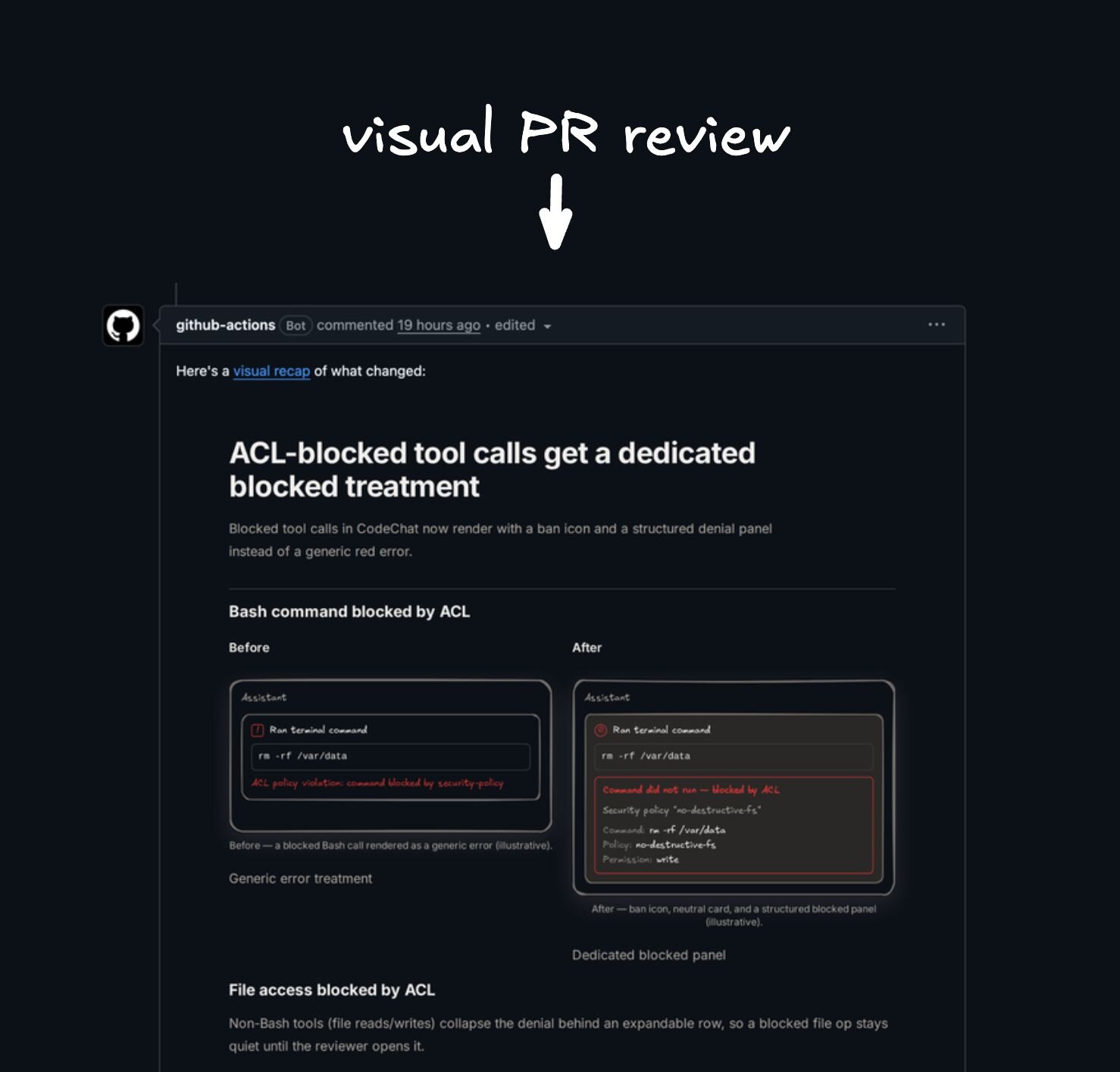
Audit another agent's work from a Codex session, Claude Code transcript, PR, branch, or run summary.
Solves for cross-agent handoffs: watch until done, reconstruct what was asked, check what actually changed and verified, report gaps, and optionally make narrow fixes.
Compare competing agent plans and choose one executable direction.
Solves for multi-agent planning loops where Codex, Claude Code, or other agents produce separate strategies. The output is a decision memo with the winning or hybrid plan, rejected alternatives, verification gates, and executor recommendation.
Keep working through ordinary ambiguity and finish with a clear decision recap.
Solves for explicit autonomy requests: the agent converts routine questions into assumptions, proceeds with conservative choices, validates the work, and recaps the decisions it made without stopping.
Use Claude Fable as the orchestrator, architect, synthesizer, and final judge while lighter agents handle token-heavy research, coding, testing, and log reduction.
Solves for expensive-model waste: Fable should spend tokens on judgment, not on reading every file, reducing every log, or manually running every browser check.

Apply the same orchestration as /efficient-fable to any high-cost frontier
model: preserve the expensive model for planning, tradeoffs, integration,
validation strategy, and final review; use cheaper agents for bounded heavy
lifting.
Solves for broad work that can be parallelized without asking the most expensive model to do every scan and every edit itself.
Check current 5-hour and weekly usage before substantial work and between parallel waves, then pause new execution at 95% until the active window is clear enough to continue.
Solves for long-running agent sessions that accidentally exhaust the current budget window mid-task instead of pausing cleanly and resuming with a self-contained plan.
Add a concise final status block convention so every completed response ends with a clear green, yellow, or red work-state signal.
Solves for ambiguity at the end of agent work: done, pending a specific non-routine step, or blocked on the user.
Example green status:
🟢 Updated quick recap docs with output examplesExample yellow status:
🟡 Code updated, set PROVIDER_WEBHOOK_SECRET before testing webhooksMake agents web-search for authoritative docs before they guess from stale model memory.
Solves for version drift and API folklore: package installs, framework config, SDK imports, provider limits, auth, security, billing, data, migrations, deploys, and repo-specific contracts all require a docs pass before implementation. For external APIs and current product behavior, web search for official docs is usually the first move.
Run the installer:
npx @agent-native/skills@latest addThe picker shows the full catalog, with the recommended skills preselected. Toggle any additional skills you want.
The installer walks you through the choices:
- Which skills to install.
- Where visual plans and recaps should live: hosted shareable links (recommended), local files only, or a self-hosted/custom Plan app.
- Agent Skills through the shared
.agentspath for Codex, Pi, Cursor, OpenCode, GitHub Copilot / VS Code, and similar agents, plus Claude Code's native skills path when selected. - User-level or project-level install.
- Whether to add managed
AGENTS.md/CLAUDE.mdinstruction blocks when the selected skills have always-on guidance. - Whether to add the PR Visual Recap GitHub Action when
/visual-recapis selected. - Whether to configure a compatible local agent connection when
/rewindis selected. The installer does not install Clips Desktop. If it is missing, invoking Rewind asks permission to open the official download flow; capture remains disabled until you turn it on in the Clips tray.
Skip the picker with --skill:
npx @agent-native/skills@latest add --skill quick-recap
npx @agent-native/skills@latest add --skill visual-recap --with-github-action
npx @agent-native/skills@latest add --skill rewind
You can also use Vercel's skills CLI for a plain skill-folder copy:
npx skills@latest add BuilderIO/skills --skill quick-recapDo not use the plain-copy installer for Rewind: it cannot configure the local
clips-screen-memory connection. Use @agent-native/skills or
@agent-native/core for a complete Rewind setup.
That installer is useful for quick copying, but it does not add the managed
AGENTS.md / CLAUDE.md instruction blocks or the PR Visual Recap GitHub
Action that pair well with these skills.
This repo is also a Claude Code plugin marketplace. To install all of the skills as a managed, updatable plugin, run these inside Claude Code:
/plugin marketplace add BuilderIO/skills
/plugin install builder-skills@builder-skills
The skills are then namespaced under the plugin (for example,
/builder-skills:quick-recap). Pull future updates with:
/plugin marketplace update builder-skillsThe plugin installs Rewind's instructions only; it cannot configure the local Clips Screen Memory MCP connection. When invoked, Rewind can ask permission to open the official Clips Desktop installer, but it must not install or enable capture silently. After Clips is installed and Rewind is enabled, also run:
npx @agent-native/core@latest skills add rewind --client claude-code --scope user --yesTreat Rewind as unavailable until screen_memory_status succeeds.
This path does not add the managed AGENTS.md / CLAUDE.md instruction blocks
or the PR Visual Recap GitHub Action; use the npx @agent-native/skills
installer above if you want those.