You signed in with another tab or window. Reload to refresh your session.You signed out in another tab or window. Reload to refresh your session.You switched accounts on another tab or window. Reload to refresh your session.Dismiss alert
{{ message }}
This repository was archived by the owner on Dec 13, 2022. It is now read-only.
Name the project as your github username
Add /auth/userinfo.email and /auth/userinfo.profile as scopes
Choose application type : Web application
Authorized javascript origins : http://localhost:5000
Authorized redirect URIs : http://localhost:5000/auth/google/callback
You need to attach the screenshot in Pull request You do not need to share your Client ID and secret
Hide them in your screenshot
There is a file : tasks.md in the root directory. Write your github username in that file.
2 sample usernames have already been written, follow that format
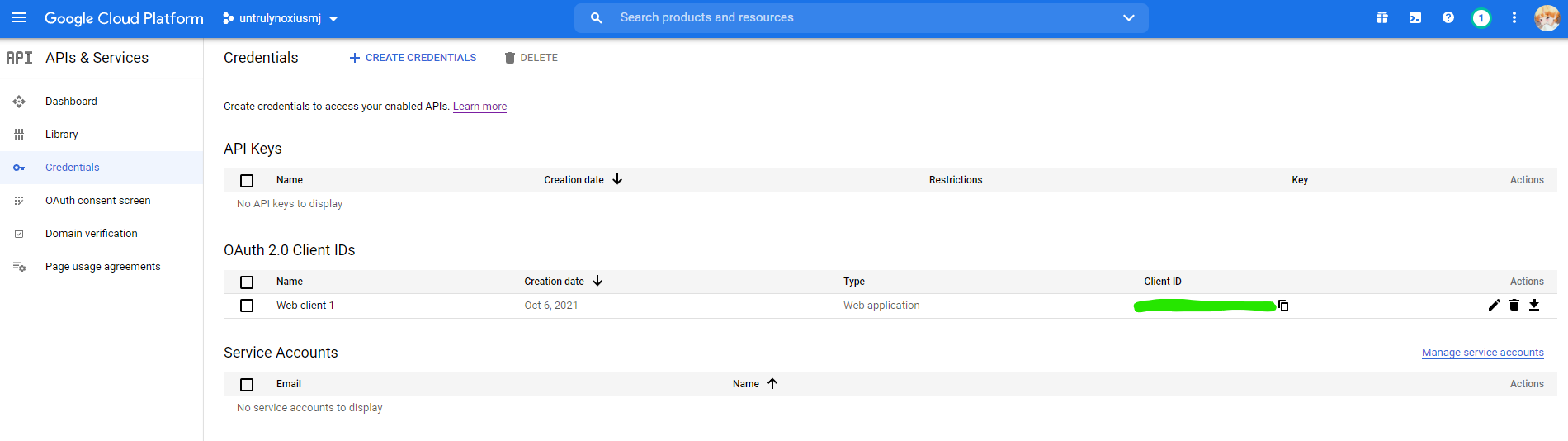
Refer sample screenshot attached:
This issue is open to all.
There is no need to claim this issue.

Create OAuth 2.0 client ID in Google Cloud Platform console.
Refer:
https://support.google.com/cloud/answer/6158849?hl=en
Name the project as your github username
Add /auth/userinfo.email and /auth/userinfo.profile as scopes
Choose application type : Web application
Authorized javascript origins : http://localhost:5000
Authorized redirect URIs : http://localhost:5000/auth/google/callback
You need to attach the screenshot in Pull request
You do not need to share your Client ID and secret
Hide them in your screenshot
There is a file : tasks.md in the root directory. Write your github username in that file.
2 sample usernames have already been written, follow that format
Refer sample screenshot attached:
This issue is open to all.
There is no need to claim this issue.