Goal
Rebuild the scenario builder so authoring a case feels like writing the case, not wiring a flowchart or hopping between form panels. A non-technical author should create and edit every step in one scrolling document — no YAML, no node graph, no ids, no formula syntax.
Originally tracked as Phase 7 of #22 — moved here because bolting seven more entity types onto the node-graph canvas makes the wrong model worse.
Why the current builder fails authors
- It only knows 3 node types.
useBuilderCanvas maps decision / transition / feedback; choices are hardcoded A–D. Quant questions, all 5 exhibit kinds, phases, and KeyData panels have zero authoring UI today — they exist only because the YAML was hand-written.
- Too much technical knowledge. Authors hit raw
nodeIds, exhibitIds arrays, {token} formula expressions, and quality-signal shapes.
- Too much clicking. The graph forces a select-node → open-side-panel → edit → close loop. You can't see and edit all the steps at once.
The reframe — the case is a document
An author thinks linearly: "Here's the setup. Candidate picks how to structure it. If bottom-up, good — show this table. Now size it, here's the formula. Then recommend; here are the ways it can land." That's a linear narrative with a few off-ramps that rejoin — which is exactly what all 6 cases already are (wrong paths were converted to redirect transitions). So the editor is a single top-to-bottom document where every block is edited in place.
Mockups
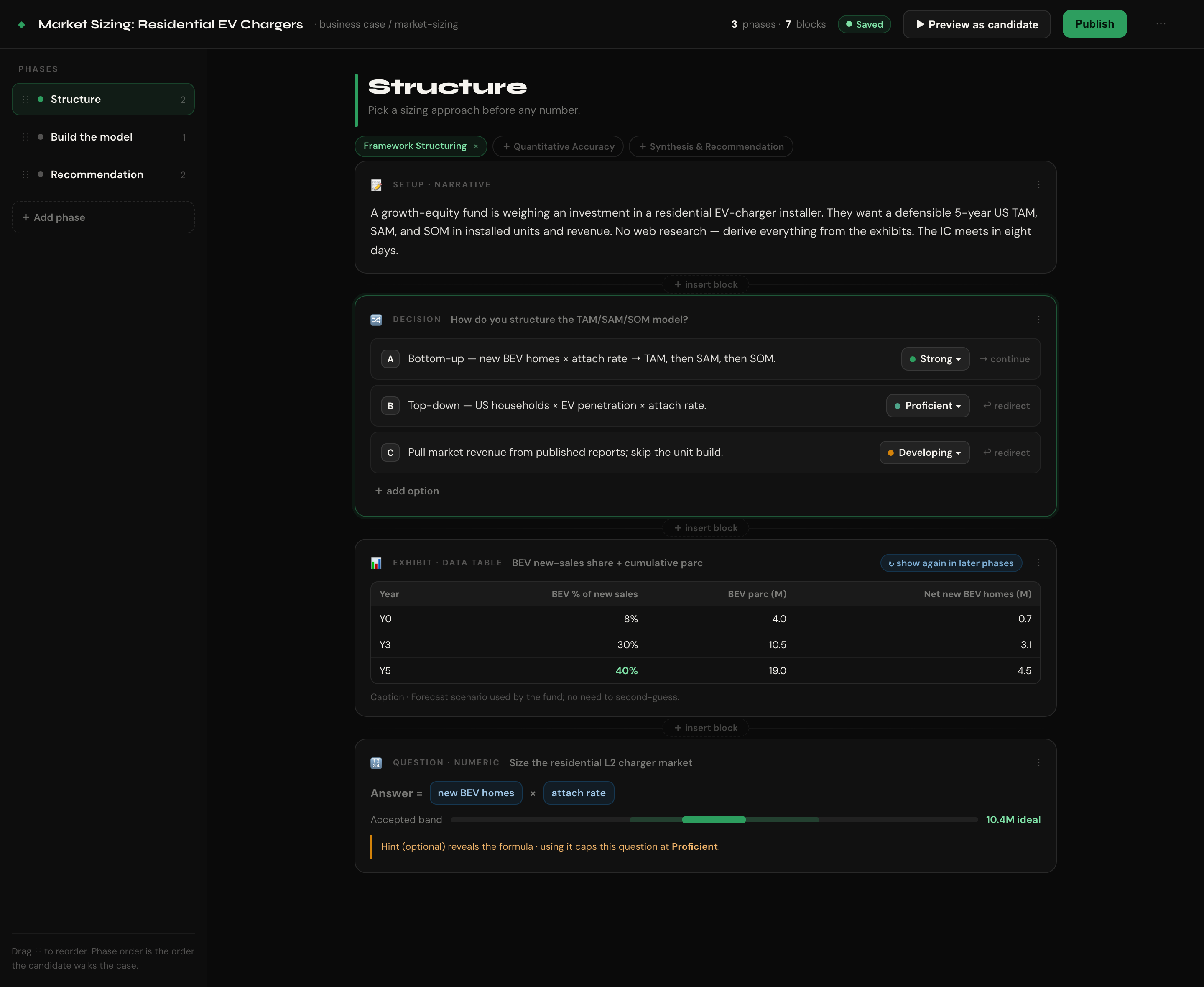
Document editor — phases rail on the left, the case as one scrolling document; every block (narrative, decision, exhibit, question) is expanded and editable where it sits. Phase order = the order the candidate walks the case.
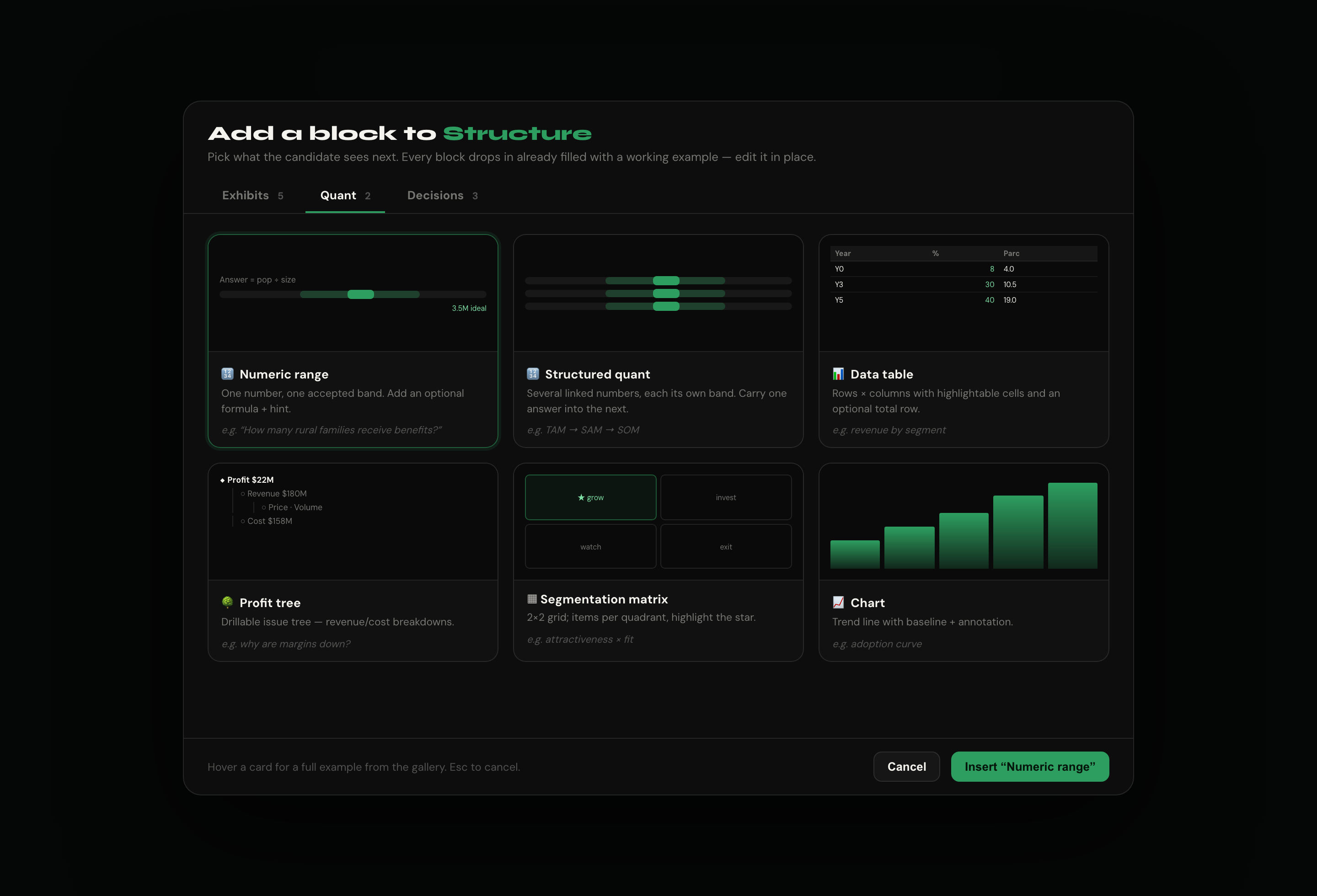
Visual gallery picker — "+ insert block" opens a tabbed gallery (Exhibits / Quant / Decisions). Each card uses the real screenshots from /dev/exhibits + /dev/quant as previews. Pick → a working, pre-filled block drops in at that spot.
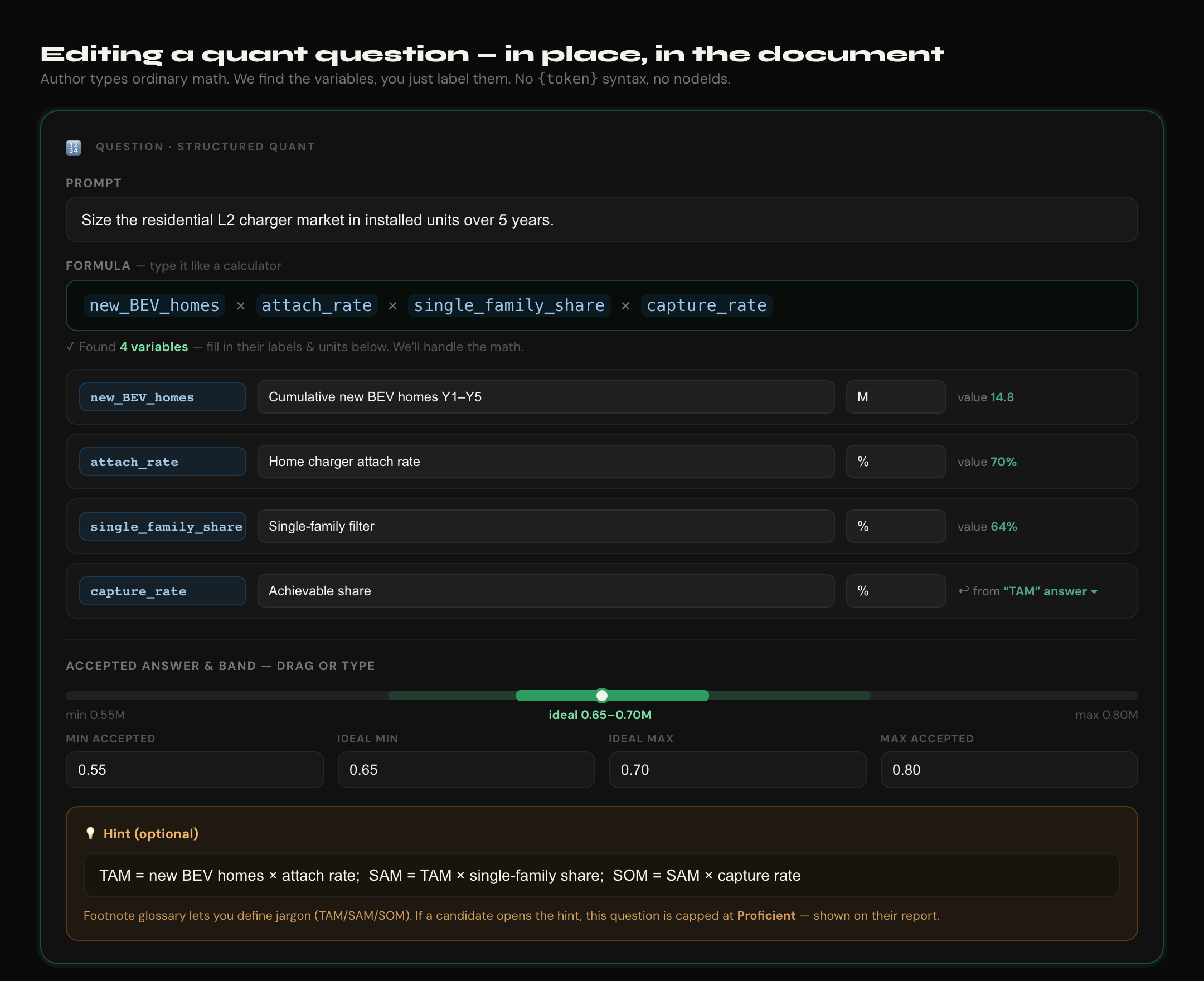
Plain-math quant editor — the author types ordinary math (new_BEV_homes × attach_rate × …); we tokenize it, find the variables, and they just label each one + pick units. Carry-forward is a dropdown ("from the TAM answer"). No {token} syntax, no nodeIds. Band by slider; optional hint capped at Proficient.
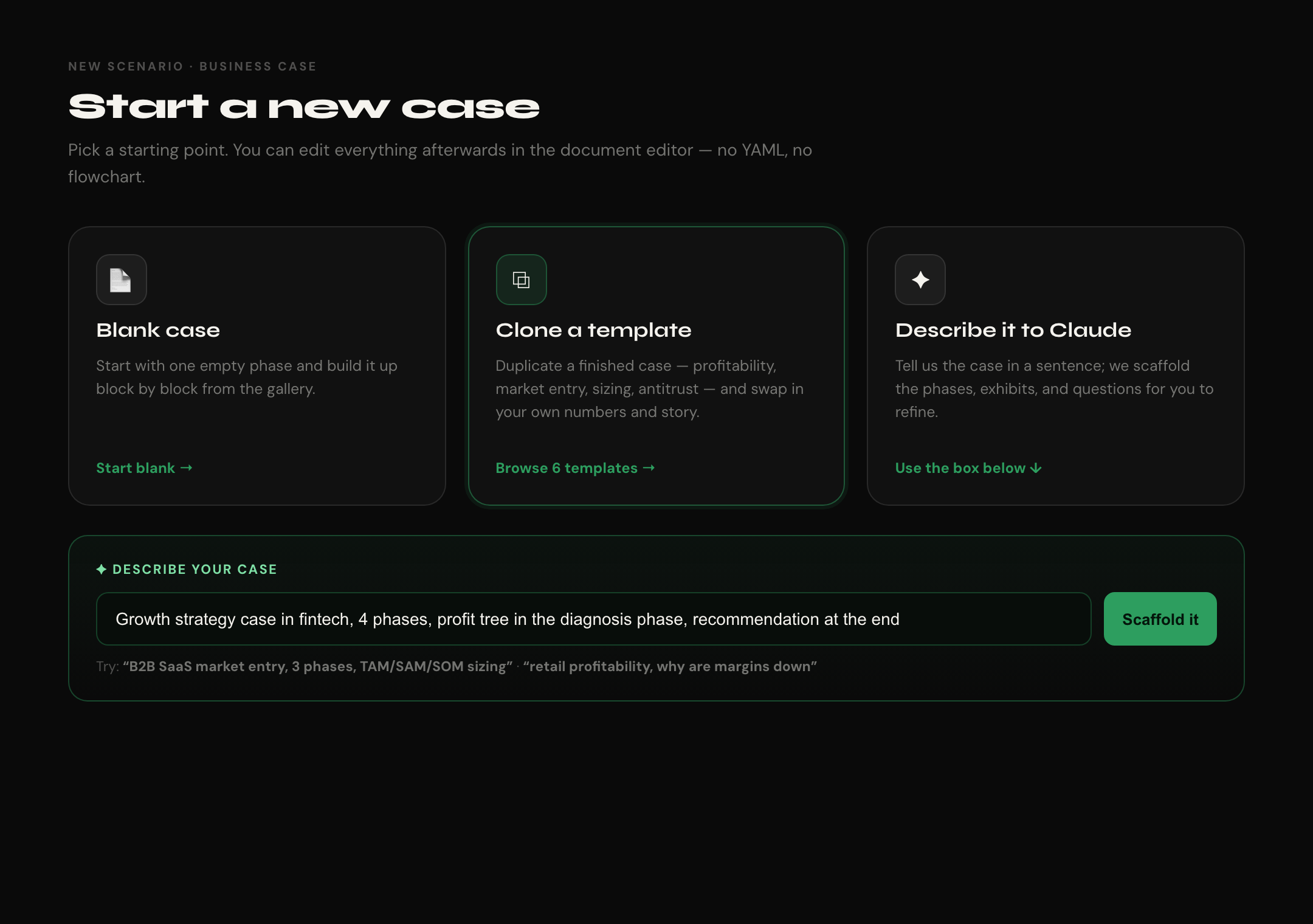
New-case start — blank, clone a template, or describe it in a sentence and let Claude scaffold the phases/exhibits/questions.
Locked decisions
- Document/outline editor, not a graph and not a side-panel inspector. One scroll, edit in place, everything expanded by default.
- Phase order carries the flow. An option with no explicit target just continues to the next block. Authors set a target only for exceptions (endings, redirects).
- Visual gallery picker for inserting blocks — card gallery with real screenshot previews + one-line blurb + hover help.
- Plain math field + tokenizer for formulas — author types normal math, we extract variables and ask only for labels/units. The
{token} expression is generated, never shown.
- AI scaffold + template clone for starting a case (reduces the blank-page tax). Reuses the existing Anthropic client; the prompt string lives in
prompts.config.ts.
- Same
Scenario JSON blob (Prisma data field) — no new tables. The document is a humane view over it, so the 6 existing cases import with zero migration. YAML round-trip stays intact as a power-user fallback.
- Graph canvas demoted, not deleted — survives under
/builder/:id/advanced for power users.
- Desktop-only. Mobile builder out of scope.
What the author never touches
| Machine detail today |
What the author sees instead |
nodeId, exhibitId |
nothing — auto-generated, referenced by label |
exhibitIds: [] per phase |
exhibit sits where you drop it; "show again later" = a toggle |
formula expression: '{a}*{b}' |
a plain math field; we tokenize and ask for labels/units |
QuantVariable.source.{nodeId,fieldId} |
"use the answer from ▾ [earlier question]" dropdown |
rubricDimensions per phase |
dimension chips clicked on/off in the phase header |
qualitySignals[] shape |
a Strong / Proficient / Developing ▾ dropdown per option |
builderMeta.positions (graph geometry) |
gone — phase order replaces it |
Architecture keystone — the Entity Registry
One descriptor per kind drives the gallery card, the blank seed, the in-document editor, and the live preview. Add a kind once → it appears in the picker, seeds non-empty, gets an editor, and renders a preview. No per-kind logic scattered across files.
// apps/web/src/builder-v2/registry.ts
type EntityKind =
  | 'data-table' | 'profit-tree' | 'segmentation-matrix' | 'chart' | 'text-exhibit'
  | 'numeric-range' | 'structured-quant'
  | 'decision' | 'transition' | 'feedback'

interface EntityDescriptor<T> {
  kind: EntityKind
  group: 'exhibit' | 'quant' | 'node'
  label: string                       // "Data Table"
  blurb: string                       // gallery caption
  screenshot: string                  // docs/screenshots/{exhibits|quant}/NN.png
  helpHtml?: string                   // hover help, lifted from /dev galleries
  seed: (id: string) => T             // non-empty blank (placeholder title, 2 cols, 2 options…)
  Editor: React.FC<EntityEditorProps<T>>   // in-document editor
  Preview: React.FC<{ entity: T }>         // wraps the PRODUCTION renderer
}Preview/Editor wrap the existing production components (DataTable, ProfitTree, SegmentationMatrix, ChartExhibit, TextExhibit, QuantNode, KeyDataPanel) → preview parity is free, not re-implemented.
Phased checklist
Phase A — Document editor shell
Phase B — Visual gallery picker + insertion
Phase C — In-document editors (edit in place, no panel hop)
Phase D — Flow by order + exception wiring
Phase E — New-case start (AI scaffold + templates)
Phase F — Preview parity + validation
Phase G — Decommission old builder
Risks / sequencing
- Build the registry (B) before the editors (C) — editors are just
Editor slots in descriptors.
- Dropping the A–D hardcode touches
validateScenario and useSimulation choice/scoring assumptions — audit those before Phase C lands.
- YAML round-trip must survive every new field — fixtures gate Phase F.
Out of scope
Multi-author permissions/workflows · version branches · real-time collab · marketplace · builder forms tuned for non-business-case tracks · mobile builder.
Acceptance
- A non-technical author builds
biz-case-001 from scratch in v2 — no YAML, no graph, no docs — editing every step in one scrolling document.
- Clone
biz-case-002 → working customized profitability case in < 15 min.
- Claude scaffold: blank → publishable draft in < 30 min for routine variants (was > 2 hrs).
- Validation blocks publishing structurally broken scenarios that reach production today.

Goal
Rebuild the scenario builder so authoring a case feels like writing the case, not wiring a flowchart or hopping between form panels. A non-technical author should create and edit every step in one scrolling document — no YAML, no node graph, no ids, no formula syntax.
Why the current builder fails authors
useBuilderCanvasmaps decision / transition / feedback; choices are hardcoded A–D. Quant questions, all 5 exhibit kinds, phases, and KeyData panels have zero authoring UI today — they exist only because the YAML was hand-written.nodeIds,exhibitIdsarrays,{token}formula expressions, and quality-signal shapes.The reframe — the case is a document
An author thinks linearly: "Here's the setup. Candidate picks how to structure it. If bottom-up, good — show this table. Now size it, here's the formula. Then recommend; here are the ways it can land." That's a linear narrative with a few off-ramps that rejoin — which is exactly what all 6 cases already are (wrong paths were converted to redirect transitions). So the editor is a single top-to-bottom document where every block is edited in place.
Mockups
Document editor — phases rail on the left, the case as one scrolling document; every block (narrative, decision, exhibit, question) is expanded and editable where it sits. Phase order = the order the candidate walks the case.
Visual gallery picker — "+ insert block" opens a tabbed gallery (Exhibits / Quant / Decisions). Each card uses the real screenshots from
/dev/exhibits+/dev/quantas previews. Pick → a working, pre-filled block drops in at that spot.Plain-math quant editor — the author types ordinary math (
new_BEV_homes × attach_rate × …); we tokenize it, find the variables, and they just label each one + pick units. Carry-forward is a dropdown ("from the TAM answer"). No{token}syntax, no nodeIds. Band by slider; optional hint capped at Proficient.New-case start — blank, clone a template, or describe it in a sentence and let Claude scaffold the phases/exhibits/questions.
Locked decisions
{token}expression is generated, never shown.prompts.config.ts.ScenarioJSON blob (Prismadatafield) — no new tables. The document is a humane view over it, so the 6 existing cases import with zero migration. YAML round-trip stays intact as a power-user fallback./builder/:id/advancedfor power users.What the author never touches
nodeId,exhibitIdexhibitIds: []per phaseexpression: '{a}*{b}'QuantVariable.source.{nodeId,fieldId}rubricDimensionsper phasequalitySignals[]shapeStrong / Proficient / Developing ▾dropdown per optionbuilderMeta.positions(graph geometry)Architecture keystone — the Entity Registry
One descriptor per kind drives the gallery card, the blank seed, the in-document editor, and the live preview. Add a kind once → it appears in the picker, seeds non-empty, gets an editor, and renders a preview. No per-kind logic scattered across files.
Preview/Editorwrap the existing production components (DataTable,ProfitTree,SegmentationMatrix,ChartExhibit,TextExhibit,QuantNode,KeyDataPanel) → preview parity is free, not re-implemented.Phased checklist
Phase A — Document editor shell
/builder/v2/:scenarioId(legacyBuilderCanvasPagestays as/advanced).useBuilderDoc— single source of truth is theScenarioblob; immutable patches; debounced autosave via existingupdateScenarioPUT.Preview).Phase B — Visual gallery picker + insertion
builder-v2/registry.tswith all 10 descriptors + non-empty seeds.docs/screenshots/{exhibits,quant}/+ blurb + example use + hover help.seed(id)inserts at the click position and links it into the phase. Empty phase shows the gallery immediately.Phase C — In-document editors (edit in place, no panel hop)
QuantFormula.expression) + hint + footnote with the "capped at Proficient" note.Strong/Proficient/Developingdropdown + target); add/remove options (drops the A–D hardcode).Phase D — Flow by order + exception wiring
Phase E — New-case start (AI scaffold + templates)
/builder/v2/new: pick track + subcategory + minutes → blank / clone template / describe-to-Claude.duplicateScenario+ prompts for new id/title.POST /api/scenarios/scaffold { description, track, subcategory, minutes } → { scenario }. Anthropic client pattern fromai-feedback.service.ts; prompt string inprompts.config.ts. Returns phases populated, placeholder exhibits in the right phases, narratives marked TODO.Phase F — Preview parity + validation
?builderPreview=trueflow via sessionStorage.validateScenariowith case rules: bandmin<max, ideal inside accepted, formula vars resolve, options have targets, exhibit/node refs resolve, phase non-empty. Plain-language messages (no nodeId jargon) in an Issues panel.publishedflips only when the Issues panel is empty.scenarioToYaml/yamlToScenario).Phase G — Decommission old builder
/builder/:scenarioId→/builder/v2/:scenarioId./builder/:scenarioId/advancedfor power users./advanced; delete dead graph code after 30 days of zero hits.Risks / sequencing
Editorslots in descriptors.validateScenarioanduseSimulationchoice/scoring assumptions — audit those before Phase C lands.Out of scope
Multi-author permissions/workflows · version branches · real-time collab · marketplace · builder forms tuned for non-business-case tracks · mobile builder.
Acceptance
biz-case-001from scratch in v2 — no YAML, no graph, no docs — editing every step in one scrolling document.biz-case-002→ working customized profitability case in < 15 min.