Summary
A w:tbl whose w:tblGrid is present but which carries no
w:tblLayout w:type="fixed" is auto-fitted by both Word and office2pdf — but by
different rules. When the declared grid has to be redistributed to fit the
content, office2pdf falls back to an equal share; Word grows the column that
carries the widest unbreakable cell and shrinks the rest.
On 01_invoice_en the converter produces column 2 == column 5 == 161.32pt
exactly, which is the equal-share signature. Word instead widens Amount (because
of the w:gridSpan="4" total rows) and narrows Description.
<w:tblGrid>
  <w:gridCol w:w="700"/><w:gridCol w:w="4200"/><w:gridCol w:w="1200"/>
  <w:gridCol w:w="1450"/><w:gridCol w:w="1476"/>
</w:tblGrid>
(= 35.0 / 210.0 / 60.0 / 72.5 / 73.8pt; no w:tblLayout anywhere in the file.)
The one root cause produces three separate symptoms on the page, all recorded
below. 03_meeting_minutes_ko reproduces its declared grid exactly on both
sides, so the divergence appears only when content forces redistribution.
Measured
tests/golden_mocks/business/sources/docx/01_invoice_en.docx, page 1, line-items
table. Column widths from mutool draw -F trace:
| column |
Word |
office2pdf |
Δ |
| # |
27.9 |
26.9 |
−1.0 |
| Description |
156.9 |
161.4 |
+4.5 |
| Qty |
47.8 |
46.0 |
−1.8 |
| Unit Price |
65.3 |
55.7 |
−9.6 |
| Amount |
153.3 |
161.3 |
+8.0 |
| table total |
451.3 |
451.4 |
+0.1 |
Unit Price is 15% too narrow; the Unit Price / Amount boundary sits at x=360.8
instead of 368.9. The total table width is correct, which is what makes this a
redistribution defect rather than a width defect.
Symptom 2 — the wrap flips and everything below moves up 11.3pt. Word wraps
"Additional render workers (4 vCPU)" onto two lines ("…workers (4" / "vCPU)");
office2pdf fits it on one. Word's Description content box is 147.2pt wide,
office2pdf's 151.3pt, and the string needs 149.4pt — the 4.1pt of extra column
width is exactly what flips the wrap. Row 3's height drops from 31.0 to 19.9pt:
| baseline |
Δ |
| row 3 |
−11.30 |
| Subtotal |
−11.29 |
| VAT |
−11.29 |
| Total Due |
−11.28 |
| "Payment terms" paragraph |
−11.50 |
| table bottom rule |
−11.30 |
Symptom 3 — right-aligned totals ride the wrong boundary. The Subtotal / VAT
/ Total Due labels are right-aligned inside the w:gridSpan="4" cell, so they
land on the col-4 / col-5 boundary:
| label right edge |
Word |
office2pdf |
Δ |
| Subtotal |
325.98 |
317.84 |
−8.14 |
| VAT (19%) |
317.52 |
310.96 |
−8.15 |
| Total Due |
320.70 |
313.26 |
−8.16 |
The Unit Price figures move with it ("$720.00" ends at 355.8 vs Word's 363.9),
while the Amount column's right-aligned figures are correct (511.86 vs 512.03,
−0.17pt) because that column's right edge is the table edge.
Reproduction
cargo run --release -p office2pdf-cli -- \
    tests/golden_mocks/business/sources/docx/01_invoice_en.docx -o out.pdf
Expected
Auto-fit distributes the surplus the way Word does — the column holding the
widest unbreakable content grows, the rest shrink — so the Unit Price column
keeps its 65.3pt, "Additional render workers (4 vCPU)" wraps onto two lines, and
the right-aligned totals land on the col-4 / col-5 boundary.
Actual
The surplus is split equally (columns 2 and 5 come out identical to the
hundredth of a point), the Unit Price column loses 9.6pt, row 2 fails to wrap,
and the whole lower half of the page sits 11.3pt high with the totals 8.1pt left
of where Word puts them.
Related: #355
Found in the 2026-07-29 full-corpus visual audit at c1adfbd (native Office GT, 150 DPI, mutool-trace geometry).
Visual comparison
| Compare |
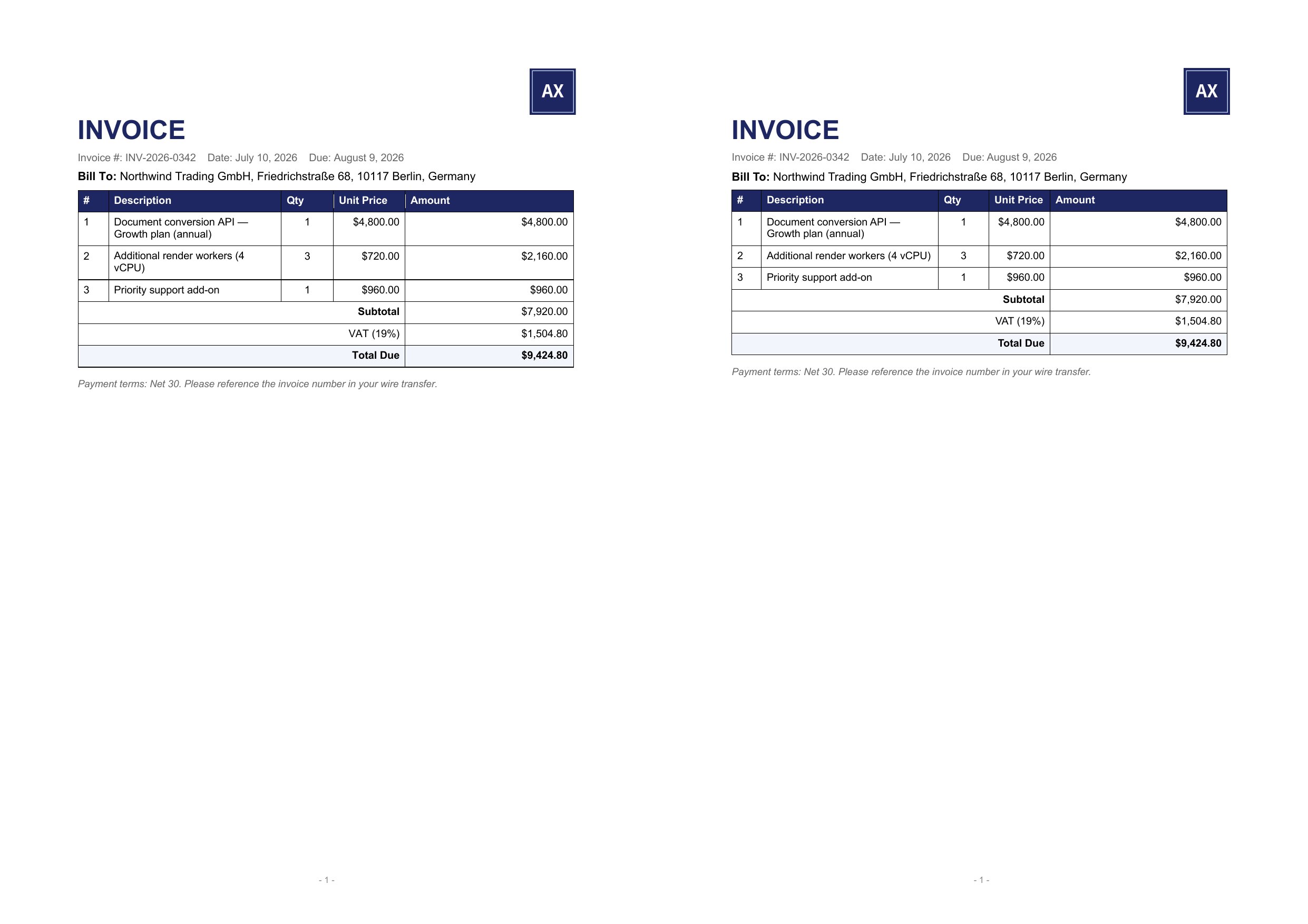 |
GT left, office2pdf right, 150 DPI, same page.
Summary
A
w:tblwhosew:tblGridis present but which carries now:tblLayout w:type="fixed"is auto-fitted by both Word and office2pdf — but bydifferent rules. When the declared grid has to be redistributed to fit the
content, office2pdf falls back to an equal share; Word grows the column that
carries the widest unbreakable cell and shrinks the rest.
On
01_invoice_enthe converter produces column 2 == column 5 == 161.32ptexactly, which is the equal-share signature. Word instead widens Amount (because
of the
w:gridSpan="4"total rows) and narrows Description.(= 35.0 / 210.0 / 60.0 / 72.5 / 73.8pt; no
w:tblLayoutanywhere in the file.)The one root cause produces three separate symptoms on the page, all recorded
below.
03_meeting_minutes_koreproduces its declared grid exactly on bothsides, so the divergence appears only when content forces redistribution.
Measured
tests/golden_mocks/business/sources/docx/01_invoice_en.docx, page 1, line-itemstable. Column widths from
mutool draw -F trace:Unit Price is 15% too narrow; the Unit Price / Amount boundary sits at x=360.8
instead of 368.9. The total table width is correct, which is what makes this a
redistribution defect rather than a width defect.
Symptom 2 — the wrap flips and everything below moves up 11.3pt. Word wraps
"Additional render workers (4 vCPU)" onto two lines ("…workers (4" / "vCPU)");
office2pdf fits it on one. Word's Description content box is 147.2pt wide,
office2pdf's 151.3pt, and the string needs 149.4pt — the 4.1pt of extra column
width is exactly what flips the wrap. Row 3's height drops from 31.0 to 19.9pt:
Symptom 3 — right-aligned totals ride the wrong boundary. The Subtotal / VAT
/ Total Due labels are right-aligned inside the
w:gridSpan="4"cell, so theyland on the col-4 / col-5 boundary:
The Unit Price figures move with it ("$720.00" ends at 355.8 vs Word's 363.9),
while the Amount column's right-aligned figures are correct (511.86 vs 512.03,
−0.17pt) because that column's right edge is the table edge.
Reproduction
cargo run --release -p office2pdf-cli -- \ tests/golden_mocks/business/sources/docx/01_invoice_en.docx -o out.pdfExpected
Auto-fit distributes the surplus the way Word does — the column holding the
widest unbreakable content grows, the rest shrink — so the Unit Price column
keeps its 65.3pt, "Additional render workers (4 vCPU)" wraps onto two lines, and
the right-aligned totals land on the col-4 / col-5 boundary.
Actual
The surplus is split equally (columns 2 and 5 come out identical to the
hundredth of a point), the Unit Price column loses 9.6pt, row 2 fails to wrap,
and the whole lower half of the page sits 11.3pt high with the totals 8.1pt left
of where Word puts them.
Related: #355
Found in the 2026-07-29 full-corpus visual audit at c1adfbd (native Office GT, 150 DPI, mutool-trace geometry).
Visual comparison
GT left, office2pdf right, 150 DPI, same page.