Summary
<printOptions gridLines="1"/> tells Excel to print the worksheet gridlines across the used
range, independently of any <border> styling. office2pdf does not read the attribute, so a
sheet that relies on printed gridlines for its structure comes out with no rules at all.
Measured
NumberFormatTests sets <printOptions gridLines="1" .../> on both worksheets.
|
GT (Excel) |
office2pdf |
| cell gridlines, all four sides, every cell in the used range |
present, ~0.5pt solid hairline |
absent |
| pages carrying them |
2-7 (337 rows × 4 columns) |
none |
explicit <border> rules on the same pages |
none declared |
none drawn |
Nothing else on those pages differs in stroke: the fixture declares no cell borders, so the
entire ruling of the sheet comes from this one attribute.
Reproduction
cargo run -p office2pdf-cli -- tests/fixtures/xlsx/poi/NumberFormatTests.xlsx -o out.pdf
mutool draw -F trace -o - out.pdf 2 | grep -ci 'stroke_path\|fill_path'   # no gridline rules
Expected
With printOptions@gridLines set, every cell in the printed range is ruled on all four
sides with Excel's gridline hairline, under any explicit border styling.
Actual
The attribute is ignored and no gridlines are drawn, leaving the column structure of a
formatting-test grid ambiguous.
Found in the 2026-07-29 full-corpus visual audit at c1adfbd (native Office GT, 150 DPI, mutool-trace geometry).
Visual comparison
| Compare |
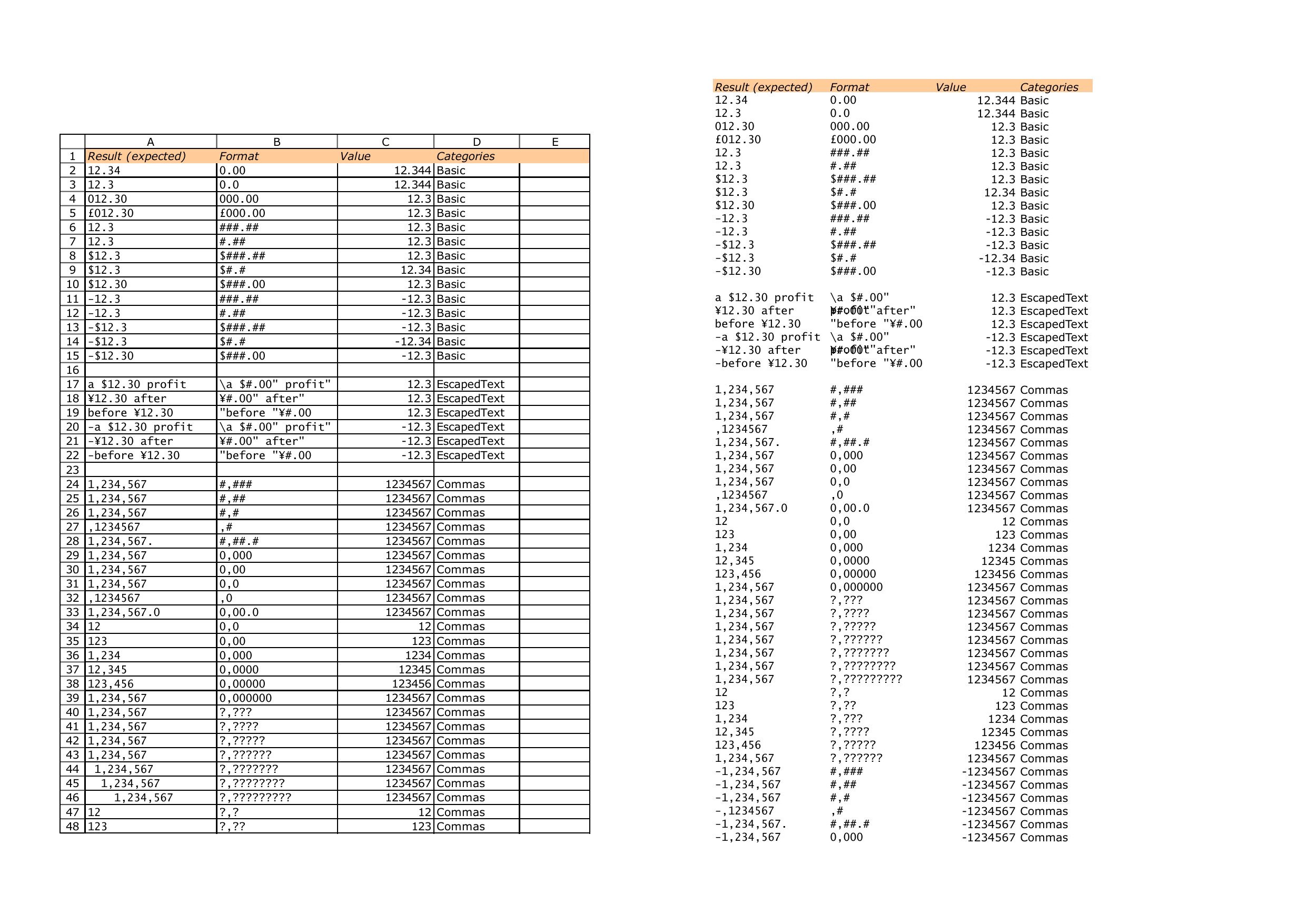 |
GT left, office2pdf right, 150 DPI, same page.
Summary
<printOptions gridLines="1"/>tells Excel to print the worksheet gridlines across the usedrange, independently of any
<border>styling. office2pdf does not read the attribute, so asheet that relies on printed gridlines for its structure comes out with no rules at all.
Measured
NumberFormatTestssets<printOptions gridLines="1" .../>on both worksheets.<border>rules on the same pagesNothing else on those pages differs in stroke: the fixture declares no cell borders, so the
entire ruling of the sheet comes from this one attribute.
Reproduction
Expected
With
printOptions@gridLinesset, every cell in the printed range is ruled on all foursides with Excel's gridline hairline, under any explicit border styling.
Actual
The attribute is ignored and no gridlines are drawn, leaving the column structure of a
formatting-test grid ambiguous.
Found in the 2026-07-29 full-corpus visual audit at c1adfbd (native Office GT, 150 DPI, mutool-trace geometry).
Visual comparison
GT left, office2pdf right, 150 DPI, same page.