Bug Report: Insufficient Visual Elements and Poor Readability on User Guide’s First Page
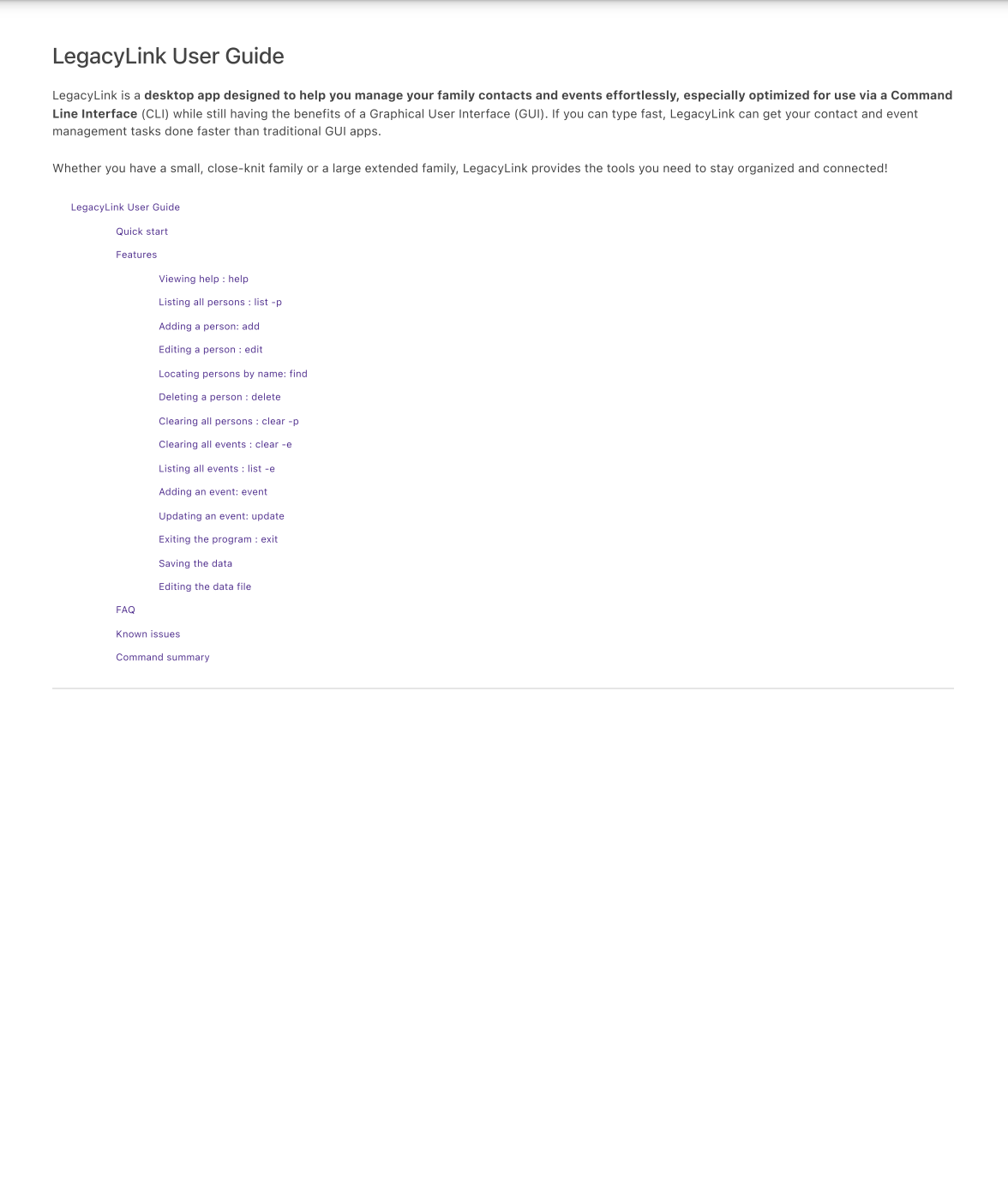
Title: First page of the User Guide lacks sufficient visual elements, uses small font, and provides inadequate information.
Description
The first page of the User Guide is intended to give users an overview of the application. However, it lacks key visual aids, uses small font, and is densely packed with text, making it difficult for readers to quickly understand the purpose and usage of the app. Additionally, no tables or organized summaries are provided, which could otherwise help users grasp the information at a glance.
Expected Behavior
The first page of the User Guide should:
- Include visual elements like diagrams, icons, or screenshots to illustrate key features.
- Use a larger and more readable font for better accessibility.
- Provide structured summaries, such as tables, to outline the main commands or features clearly.
Actual Behavior
- No visual elements are present to guide readers (e.g., no icons, diagrams, or screenshots).
- The font size is small, making it hard to read.
- Key features and commands are listed in plain text without tables or summaries, making it difficult for users to scan and understand quickly.
Severity
severity.Low
Type
type.DocumentationBug
Why This Is a Problem
- Difficult to Navigate: Users cannot quickly find relevant information, which hampers their ability to use the app efficiently.
- Accessibility Issues: The small font size makes it harder for users with visual impairments to read.
- Lack of Visual Cues: Without visuals or tables, the User Guide fails to engage readers and make critical information stand out.
Suggestions for Improvement
-
Add Visual Elements:
- Include screenshots of the application’s interface on the first page.
- Add icons or diagrams to highlight key features and commands.
-
Improve Readability:
- Increase the font size for better readability, especially for headers and important sections.
-
Use Tables for Command Summaries:
- Introduce a table to summarize key commands and their purposes.
- Example:
| Command |
Description |
Example |
list -p |
Lists all persons |
list -p |
add |
Adds a new contact |
add -n John -p 91234567 |
Bug Report: Insufficient Visual Elements and Poor Readability on User Guide’s First Page
Title: First page of the User Guide lacks sufficient visual elements, uses small font, and provides inadequate information.
Description
The first page of the User Guide is intended to give users an overview of the application. However, it lacks key visual aids, uses small font, and is densely packed with text, making it difficult for readers to quickly understand the purpose and usage of the app. Additionally, no tables or organized summaries are provided, which could otherwise help users grasp the information at a glance.
Expected Behavior
The first page of the User Guide should:
Actual Behavior
Severity
severity.LowType
type.DocumentationBugWhy This Is a Problem
Suggestions for Improvement
Add Visual Elements:
Improve Readability:
Use Tables for Command Summaries:
list -plist -paddadd -n John -p 91234567